Prep 5: Forms and Events
Textbook Reading
- HTML
- 5.3 Introducing Forms
- 5.4 Form Control Elements
- MDN: Forms and buttons in HTML
- JS
- 8.8 Functions
- 9.3 Events
- 9.4 Event Types
- 9.5 Forms in JavaScript
- Blog Post: Handling Forms with Vanilla JavaScript by Matias Hernandez
Form & Function
Your goal is to build a basic form (based on the knowledge from the readings) that will let a user dynamically modify parts of the page. You don’t need to write any CSS for this activity.
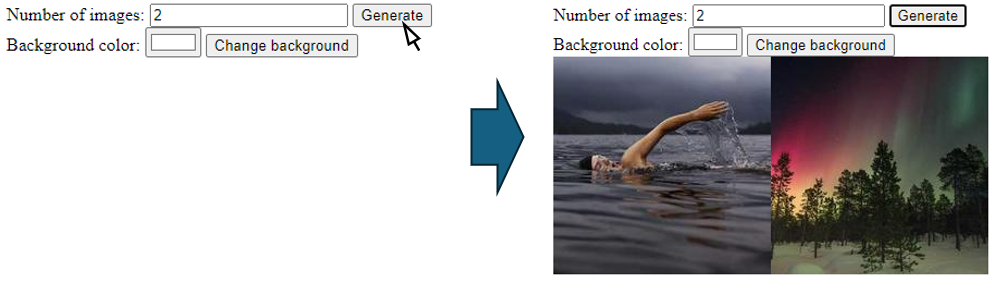
The user should be able to specify a number of random images to generate, then click generate to add them to the page:
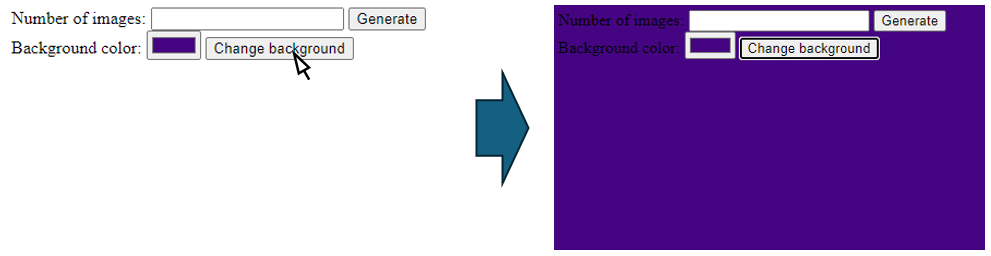
They can also select a background color and click change to update the page background:
Getting Started
First, download the starter code here:
Unzip it to cs343/preps/05 or somewhere else safe and accessible. Open the index.html and script.js files in VS Code.
The starter code is intentionally barebones. You’ll need to write virtually all of the HTML and JavaScript yourself.
Forms in JavaScript
I recommend referencing the blog post on handling forms.
The important takeaways are to:
- Use
event.preventDefault()in your event handlers to prevent the default form submission behavior.- Otherwise, the page will refresh!
- Access form elements and data using
FormData, or by directly referencing the input elements via theirids.- If you have a
FormDataobject, you can use its.get()method - If you have a reference to the input element, you can use
.valueto get the current value of an input element.
- If you have a
As a quick reference, here’s a basic outline of how to handle form submissions in JavaScript:
// Get the form
const form = document.getElementById("my-form");

// Add an event listener for the form submission
form.addEventListener("submit", onFormSubmit);

// Function to handle the form submission
function onFormSubmit(event) {
    event.preventDefault(); // IMPORTANT!

    // Your code to handle the form submission goes here
}
Anonymous Functions, Anyone?
You can also create a function directly within the addEventListener call, like this:
form.addEventListener("submit", function(event) {
    event.preventDefault(); // IMPORTANT!

    // Your code to handle the form submission goes here
});
This is actually preferred, since it puts the event handling logic right where the event listener is added, making the code easier to read and avoids polluting the global namespace.
Part 1: Forms
In the body, create the following elements:
-
Create a form for specifying the number of images:
- Give this form the
idof"image-form". - It should have a
labelthat says “Number of images:”, - An
inputthat only lets you enter numbers (type="number"), -
And a
buttonof type"submit"that says “Generate”.Hint: Button Syntax
Note that buttons use the
<button>tag, and they have both a start and an end tag, with the button text placed between them:<button type="submit">Generate</button>
- Give this form the
-
Create a second form for specifying the background color:
- Give this form the
idof"background-form". - It should have a
labelthat says “Background color:”, - An
inputthat lets you pick a color, - And a
buttonof type"submit"that says “Change background”.
- Give this form the
- Afterwards, create an empty
divto store your images.- Give this the
idof"images".
- Give this the
- I recommend that you give any input you wish to access via JavaScript a unique
id!- Like the input fields, the buttons, the div, etc.
- Alternatively, you can use
FormData, which can help access the entire form’s data.
Part 2: Functionality
In script.js, add JavaScript code so that:
- When the “Generate” form is submitted (the
"submit"event):- It should clear all images already in the
div. (remember how to do this?) - It should add random images to the
divbased on the number specified in the form:- Images should be 200x200 in size
- Images should be from Lorem Picsum:
https://picsum.photos/[WIDTH]/[HEIGHT]?random=[NUMBER](replace[WIDTH],[HEIGHT], and[NUMBER]) - Each image should be different (hint: change
[NUMBER]each time you add an image - use an index or a counter)
- Tip: Recall how to create and append elements to the DOM (make a helper method!):
- Use
document.createElementto create a new"img"element. - Set the
srcattribute of the image to the appropriate URL. - Append the image to the
divcontaining the images.
- Use
- It should clear all images already in the
- When the “Change background” form is submitted:
- It sets the background color of body to the color specified in the form
- You may set an inline style to accomplish this (using the
styleproperty of an element) - Just set
document.body.style.backgroundColorto the selected color.
- You may set an inline style to accomplish this (using the
- It sets the background color of body to the color specified in the form
Hints
- Remember to prevent the default form submission behavior using
event.preventDefault(). - Values may need to be converted from strings to numbers using
parseInt(...)when necessary. - You can clear all contents by setting
element.textContent = ""or callingelement.replaceChildren().
Submit both index.html and script.js to Gradescope.