Building Bootstrap
In this activity, you’ll build a tiny knockoff of Bootstrap, the most popular CSS framework in the world. First you’ll read a page that uses Bootstrap-style classes, then you’ll write the CSS that makes those classes work, and finally you’ll make the layout respond to screen size.
Bootstrap is not magic. It’s just a big stylesheet full of reusable classes, exactly like the ones you wrote in Reusable CSS Classes. Once you’ve built a few of them yourself, using the real thing (like you will in the lab) is much less mysterious.
Getting Started
The worksheet has everything you need to do this activity: the instructions, the questions, and space for your answers. Print it, or fill it out on a tablet. This page just provides the starter code, hints, solutions, and submission info.
Download both starter files below and save them in the same folder (like in cs343/acts/building-bootstrap).
Open the folder in VS Code and start a live preview.
- Guide for Live Preview extension
- Guide for Live Server extension
You will only edit shoestring.css. When you’re done, you can turn off the dashed outlines by commenting out the outline line at the top of the stylesheet.
Code for the Worksheet
In Part 3 of the worksheet, you’ll try out a media query. Copy this example to the bottom of shoestring.css:
@media (max-width: 768px) {
    h1 {
        color: red;
    }
}
You’ll edit it into your real media query later, so leave it in for now.
Hints and Solutions
Try the worksheet on your own first. Each question has its own hint (a nudge) and solution (the full answer). Write your answers on the worksheet before you open a solution!
Part 1: Read the Classes
Q1 hint
Use Ctrl+F in index.html to search for row. Remember that the class can be on any tag, not just a <div>. Count only the columns that are directly inside each row.
Q1 solution
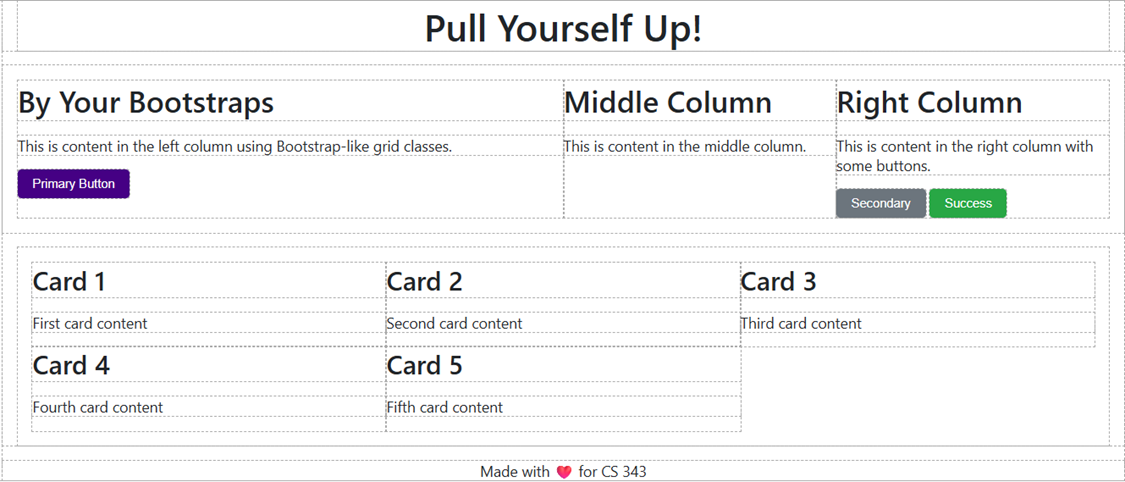
There are four rows: the <div> in the header (1 column: the <h1>), the main content <div> (3 columns), the cards <div> (5 columns), and the <footer> (1 column).
Q2 hint
Look at the three <div> elements directly inside the main row. Add the numbers on the end of their col-md- classes.
Q2 solution
col-md-6, col-md-3, col-md-3. They add up to 12.
Q3 hint
Imagine the row is cut into equal slices. A column that’s half as wide takes up half of the slices. How does the number in its class compare to the total from Q2?
Q3 solution
The number is how many of the 12 equal slices the column takes up. col-md-6 takes 6 of 12 (half); col-md-3 takes 3 of 12 (a quarter).
Q4 hint
A column with col-md-N takes up N slices out of 12, so its fraction is N/12. Divide on a calculator, then multiply by 100 for the percentage.
Q4 solution
| Class | Fraction | Percentage |
|---|---|---|
col-md-6 |
6/12 | 50% |
col-md-3 |
3/12 | 25% |
col-md-4 |
4/12 | 33.33% (33.333333%) |
col-md-1 |
1/12 | 8.33% (8.333333%) |
col-md-12 |
12/12 | 100% |
Q5 hint
Add up the slices of the cards one at a time (4, 8, …). How many cards can you add before the total goes over 12?
Q5 solution
Three fit (3 × 4 = 12). Cards 4 and 5 go on the second line, taking up 8 of the 12 slices, so the last 4 slices of that line are empty (the blank space at the bottom right).
Part 2: Build Bootstrap
Coding hint: .row
You need display: flex; and flex-wrap: wrap;.
Coding hint: column widths
Use your percentages from Q4, with all the decimals, like 8.333333%. If your columns look slightly off, check your percentages.
Coding hint: CSS variables
Write var(--name) where you’d normally write a value, such as background-color: var(--primary-color);.
Q6 hint
Look at your .row rule. It has two declarations: one is display: flex. Comment out the other one and see what happens to the cards.
Q6 solution
flex-wrap: wrap. Without it (the default is nowrap), all five cards are squeezed onto a single line, shrinking each below its percentage or overflowing.
Q7 hint
Look at the dashed outline of each row. Is the extra space between the outline and the page’s other content, or between the outline and the row’s own content?
Q7 solution
m-3 adds space outside the row’s box (the margin, between the row’s outline and its neighbors). p-3 adds space inside the row’s box (the padding, between the row’s outline and its columns). m = margin, p = padding.
Q8 hint
Imagine the primary color was used in 20 different rules, and your instructor asks you to change it. What would you have to do in each approach?
Q8 solution
If the color is a variable, you can change it in one place (in :root) and every rule that uses var(--primary-color) updates. With hex codes, you’d need to find and edit every copy (and could miss one).
Part 3: Responsive Design
Coding hint: sharing a rule
Do you have to write the same rule five times? No! Separate several selectors with commas to share one rule: .col-md-1, .col-md-3, .col-md-4 { ... }.
Coding hint: testing a small screen
Drag your browser window narrower, or open DevTools and use the responsive/device mode, which shows the viewport’s width in pixels.
Q9 hint
Think about what you’d have to do to add a sixth card, or to change a width, with each approach. Also think about what the HTML looks like with lots of class names.
Q9 solution
Sample answer: Advantages: write once, reuse everywhere; consistent look; the HTML shows the layout at a glance; no new CSS needed to add a column. Disadvantages: the HTML gets cluttered with many class names; the class names describe appearance rather than meaning; you have to learn the framework’s vocabulary. Without classes, you’d write a separate width rule (and a separate media query) for every column.
Q10 hint
The columns’ percentages stay the same, but what happens to the pixel widths when the window gets smaller? Try a window about 400px wide.
Q10 solution
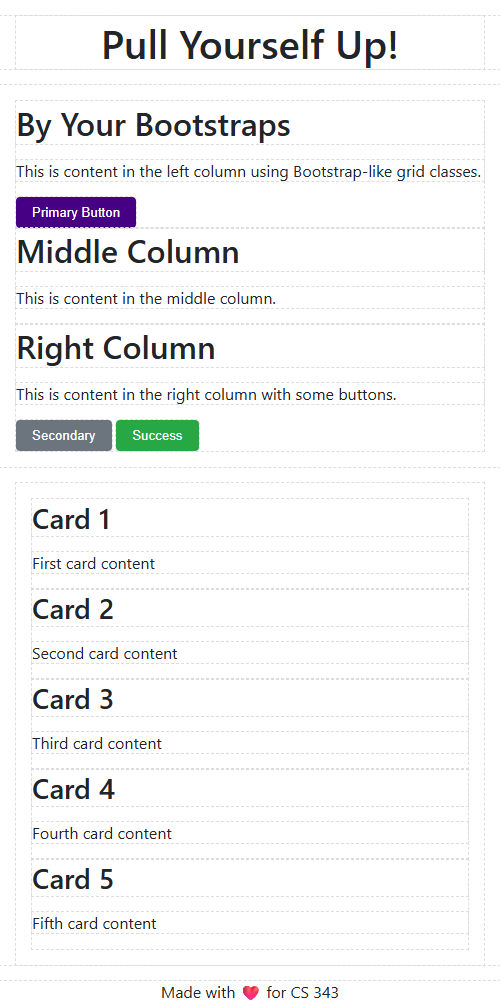
The columns stay at their percentages, so each one gets very narrow and the text is cramped or wraps awkwardly. It isn’t a good phone layout.
Q11 hint
In the pattern, which part is the condition, and which number in it would you change? min-width is the opposite of max-width.
Q11 solution
The title turned red at about 768px (when the window became 768px wide or narrower). Change 768px to 500px. With min-width, it flips: the rule would apply when the window is at least 768px wide (wide screens) instead of narrow ones.
Q12 hint
What does flex-wrap: wrap do when the children are too wide to fit on one line? Look back at your answer to Q6.
Q12 solution
.row still has flex-wrap: wrap. Each column is now 100% wide, so only one fits per line, and the rest wrap onto new lines below.
Finished Stylesheet
Finished shoestring.css rules
.row {
    display: flex;
    flex-wrap: wrap;
}

.col-md-1 { width: 8.333333%; }
.col-md-3 { width: 25%; }
.col-md-4 { width: 33.333333%; }
.col-md-6 { width: 50%; }
.col-md-12 { width: 100%; }

.m-0 { margin: 0 !important; }
.m-3 { margin: 1rem !important; }
.p-0 { padding: 0 !important; }
.p-3 { padding: 1rem !important; }

.btn-primary { background-color: var(--primary-color); }
.btn-secondary { background-color: var(--secondary-color); }
.btn-success { background-color: var(--success-color); }

@media (max-width: 768px) {
    .col-md-1,
    .col-md-3,
    .col-md-4,
    .col-md-6,
    .col-md-12 {
        width: 100%;
    }
}
Why does Bootstrap use !important?
The real Bootstrap writes spacing classes as margin: 1rem !important;. A spacing class is a utility: it must always win, even if some other rule also sets the element’s margin. It’s optional here.
Here is the finished mobile view:
Bonus: Swap in the Real Thing
If you finish early, replace your knockoff with the real Bootstrap. In index.html, replace the shoestring.css <link> with this one:
<link rel="stylesheet" href="https://cdn.jsdelivr.net/npm/bootstrap@5.3.3/dist/css/bootstrap.min.css">
Reload the page. What looks the same? What looks different? (Bootstrap’s row and col-md-* classes work almost exactly like yours.) You’ll get lots of practice with the real thing in the next lab.
Submission
Submit both index.html and shoestring.css (even if incomplete) to the corresponding Gradescope assignment. You do not need to submit the worksheet.