GP2: Schema Design
Due: Monday, Oct 5th
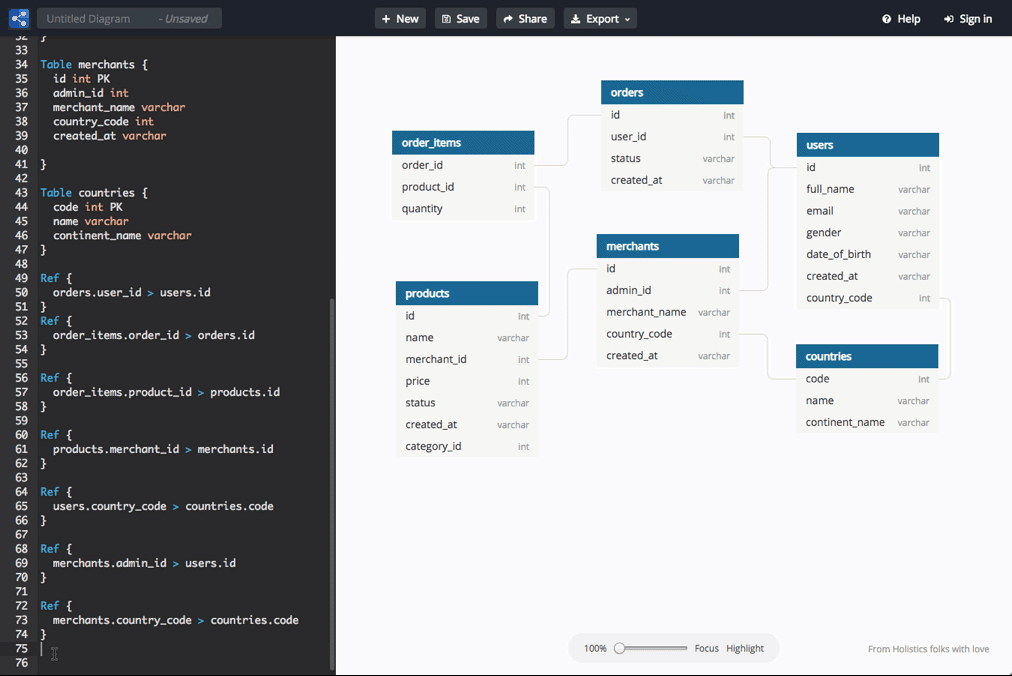
Image source:
dbdiagram.io
In GP1 you said what one row of each table represents. In GP2 you say exactly what is in that row: the columns, their types, the keys, and the references that tie your tables to each other and to the core schema.
This is the same work you did in HW3, with two differences.
There is no EER model to map from; your GP1 document is the model.
And the result does not go to Gradescope and disappear.
Your schema goes into the class repository, where the schema becomes the design that your models.py implements in GP3 and that your queries and endpoints depend on for the rest of the semester.
What to commit
Two files in your team's directory, src/planner/<area>/:
schema.dbml– your tables, written by hand in DBMLschema.png– the diagram of that file, exported from dbdiagram.io
Also update your README.md as described in Updating the README below.
The DBML file is the source, and the picture is a copy of the DBML.
A reviewer comments on the .dbml, and anyone reading your directory on GitHub looks at the .png.
Both must describe the same tables.
The DBML file
Start from the core stubs
Begin the file with a Project block naming your area:
Project advising {
  database_type: 'PostgreSQL'
  Note: 'Advising feature area of plan.cs.jmu.edu (CS 374 GP2).'
}
Below the Project block, paste core-stubs.dbml, so that your foreign keys have something to point at.
Delete any stub your tables do not reference.
Do not add columns to the stubs, and do not copy in the full tables from core.dbml.
Your own tables go below the stubs.
Your tables
Start from the list in your GP1 README, and change the list wherever the design work shows you the list was wrong. A table that splits in two, or two that merge into one, is a normal outcome of this assignment, not a failure of GP1.
Divide the tables among the team so that each person owns two or three of them, and commit your own tables yourself. Say in the pull request description who owns which. Four people editing one file on one branch will produce merge conflicts; pull before you start, keep each person's tables together in the file, and commit small.
Follow the conventions the core schema already uses, so that the six areas read like one database:
- Table and column names are lowercase, singular, and separated by underscores.
- A single-column surrogate key is named
<table>_idand declared[pk, increment]. - A foreign key column has the same name as the key it references, unless the table has two references to the same key, in which case the names say which is which (
advisor_id,student_id). - Use
textfor strings, notvarchar(n), unless the length limit is a real rule of the domain. - Use
datefor a calendar date andtimestamptzfor a moment in time.
Table names are shared by the whole database, since all six areas are built into one.
Before you open the pull request, check your names against the core schema and against the other five teams' GP1 READMEs on main.
If two teams want the same name, the team whose meaning is narrower renames.
Keys and constraints
Every table has a primary key.
Declare a composite key in an indexes block, as you did in HW3.
A primary key is a claim about the world: no two rows can ever agree on these columns.
Check the key against your note for the table.
If the note says one row is one student's attempt at one course, and the key is (student_id, course_id), then a student who repeats a course cannot be stored, and in-major GPA depends on exactly that case.
A surrogate key does not remove this question; a surrogate key moves the question to other columns.
When a table has an increment key, ask what combination of other columns should still be unique, and declare that combination [unique] in the indexes block.
Mark every column [not null] unless you can say when the value would be missing.
If a column can be null, the column's note says what null means.
Give columns a default where one is obvious, such as false for a flag or the current time for a creation timestamp.
For a column with a small fixed set of values, such as a status, you may declare a DBML enum.
Give the enum a name specific to your area, since enum names, like table names, are shared by the whole database.
If two teams end up with similar enums, we will sort that out in GP3.
If the set of values is something a director should be able to change without a programmer, use a table instead of an enum.
References
Write a Ref for every foreign key, with the cardinality the domain actually has: > for many-to-one, - for one-to-one.
A foreign key column without a Ref is not a relationship, and the diagram will not show the relationship.
Your references may point at your own tables and at the core schema, and nowhere else. If your design needs a row that another team owns, store what you need to find that row (a course, a term, a student) as a reference into the core, and leave the join to your GP4 queries. If that is not enough, you have found a boundary problem; say so in the pull request description rather than working around the problem.
Storing each fact once
The Week 5 reading showed what goes wrong when the same fact lives in two places: one copy gets updated and the other does not. Look for three ways redundancy creeps into a design:
- Derived values. Do not store what a query can compute, such as a GPA, a count of credits, or the number of students in a section. If you have a real reason to store one (a value that must be kept as of a certain date, for example), say why in a note.
- Copies of the core.
A course's title belongs to
course; a student's name belongs toperson. Your tables reference them rather than repeating them. - Repeating groups.
No numbered columns (
course1,course2,course3) and no lists packed into atextcolumn. A list is a table of its own, one row per item, exactly like a multivalued attribute in HW3.
Notes
Notes are how the next person, who may be you in November, knows what you meant.
- Every table has a note saying what one row is, in the same form as your GP1 README: "One row is one …".
- Every column whose meaning is not obvious from its name has a note.
first_nameneeds no note.status,is_final, andeffective_termdo. - Every decision that had a defensible alternative gets a sentence or two in the note of the table it affects: what you chose, and why. For example: why a table has a surrogate key rather than a composite one, why something is a table rather than a column, or why you store a value that could be derived.
As in HW3, the decision notes carry a large part of the grade.
The diagram
Paste your DBML into a dbdiagram.io diagram, arrange the tables so the diagram reads clearly, and export the diagram as a PNG named schema.png.
Arrange by hand; auto-arrange rarely produces something readable. Put the core stubs together along one edge, keep your own tables together, and avoid crossing lines where you can. The PNG should be legible, without zooming, at the width GitHub displays images. The repository rejects files over about 1 MB, which a single diagram will not come near unless something is wrong with the export.
The DBML file does not record where each table sits on the canvas; dbdiagram.io stores that in the diagram. So keep one dbdiagram.io diagram for the team and export from that diagram every time, rather than pasting into a new diagram and arranging from scratch. Decide now who owns the diagram, and have that person share the diagram with the rest of the team.
Updating the README
Two changes to your team's README.md from GP1.
Proposed tables. Replace the list with the tables you actually designed, still one sentence per table. Rename the section "Tables", and add a short paragraph at the end saying what changed since GP1 and why.
Proposed queries. After each query, add the tables the query reads, in parentheses. A query that needs a table another team owns names that team's table too, since GP4 allows reading across areas. If a query can no longer be answered, either fix the schema or strike the query and say why; do not leave the query silently unanswerable.
This is the check that your tables do what GP1 said they would. Reviewers will pick a query and try to trace the query through your diagram.
From now on
This is not the last time you will touch these files.
From GP3 on, models.py is what actually builds your tables, and schema.dbml is the documentation of what models.py builds.
Any pull request that changes your tables updates schema.dbml and schema.png in the same pull request.
A reviewer who finds a column in models.py that is not in the diagram, or the other way around, will say so, and that is a finding against the deliverable.
Keeping the two in step is also how the history of your design ends up on GitHub.
By December, the commit log on schema.dbml should tell the story of every change you made and when.
Grading criteria
I will read your schema looking for the following, roughly in order of weight:
- Correct keys and constraints.
Primary keys that match what the table note says one row is, uniqueness where the domain requires uniqueness, and
not nullwherever a value is required. - Coverage. The tables can answer the queries in your README, and support the use cases, without inventing data that is not stored anywhere.
- Each fact stored once. No derived values without a stated reason, no copies of core data, no repeating groups.
- Decisions explained. Notes that say what you chose and why, wherever a reasonable team could have chosen otherwise.
- Boundaries respected. References only into your own tables and the core schema.
- The diagram. A PNG that matches the DBML and that someone can read.
I am also looking at the commit history for evidence that all four people designed tables, and at how your team responds to the review.
Submission and review
Your new branch, <area>/gp2, will be created after I merge GP1.
Switch to the GP2 branch, commit as you go, and open a pull request by the deadline.
See the GitHub Workflow for how branches, pull requests, and reviews work.
Because of fall break, the review window is longer than usual. Your reviewing team has until Monday, Oct 12 to review your pull request, and you have until Wednesday, Oct 14 to respond and push any follow-up commits. See Code Reviews for what the reviewers are asked to look at.