Oct 01: Python Environment
Learning Objectives
After today's class, you should be able to:
- Explain what a venv isolates, and how pip installs the pinned versions.
- Generate realistic test data using the Faker library and psycopg.
Lesson Outline
Reading Debrief [10 min]
- Week 6 reading (documentation mode)
- Which PostgreSQL types did you choose on Tuesday, and why?
- Which Faker providers did you find that fit your tables?
- Type hints:
def make_hotels(count: int) -> list[tuple]:
Python venv [10 min]
- Activate the environment you made for the class repository
- Linux/macOS:
source .venv/bin/activate - Windows (Git Bash):
source .venv/Scripts/activate - Your prompt should begin with
(.venv)
- Linux/macOS:
- What's inside
.venv?which pythonandwhich pip– the copies inside.venv, not the system onespip list– everything installed, including dependencies of dependenciespip show faker– the version, and where it came from
- Why the versions in
pyproject.tomlare pinned- Run
pip install -e ".[dev]"again – Requirement already satisfied - When a pin changes, that same command moves you to the new version
- Run
deactivate– and whyimport fakernow fails
psycopg [10 min]
- Same DB-API as
sqlite3: connection, cursor,execute(),fetchall() - Differences:
%splaceholders, connection string,withblock closes the connection - Passwords belong in a password file, never in source code
- Psycopg 3: Basic module usage
Faker [15 min]
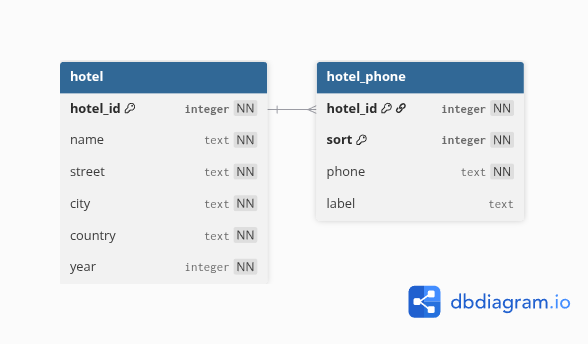
- hotel_psycopg.py
GENERATED ALWAYS AS IDENTITY, andRETURNINGto get the ids back- Foreign keys come from those ids, not from
range(1, 21) Faker.seed()– the same "random" data on every run
Lab Activity [30 min]
- Psycopg and Faker
- Submit
hw2_psycopg.pyon Gradescope
Your To-Do List
- Finish the lab and submit
hw2_psycopg.pyon Gradescope ← due Friday - Commit your team's GP2 schema and open a pull request ← due Monday
- Exam 1 is Tuesday, Oct 13 (the week after fall break)