Core Schema Design
Ten tables are provided for you. Every team shares them, and nobody changes them. But I'm open to suggestions if you find a way to improve the design.
These tables exist because six teams cannot each invent their own idea of what a person or a course is.
Once course_id means the same thing in all six areas, your tables can point at it and your queries can join across it.
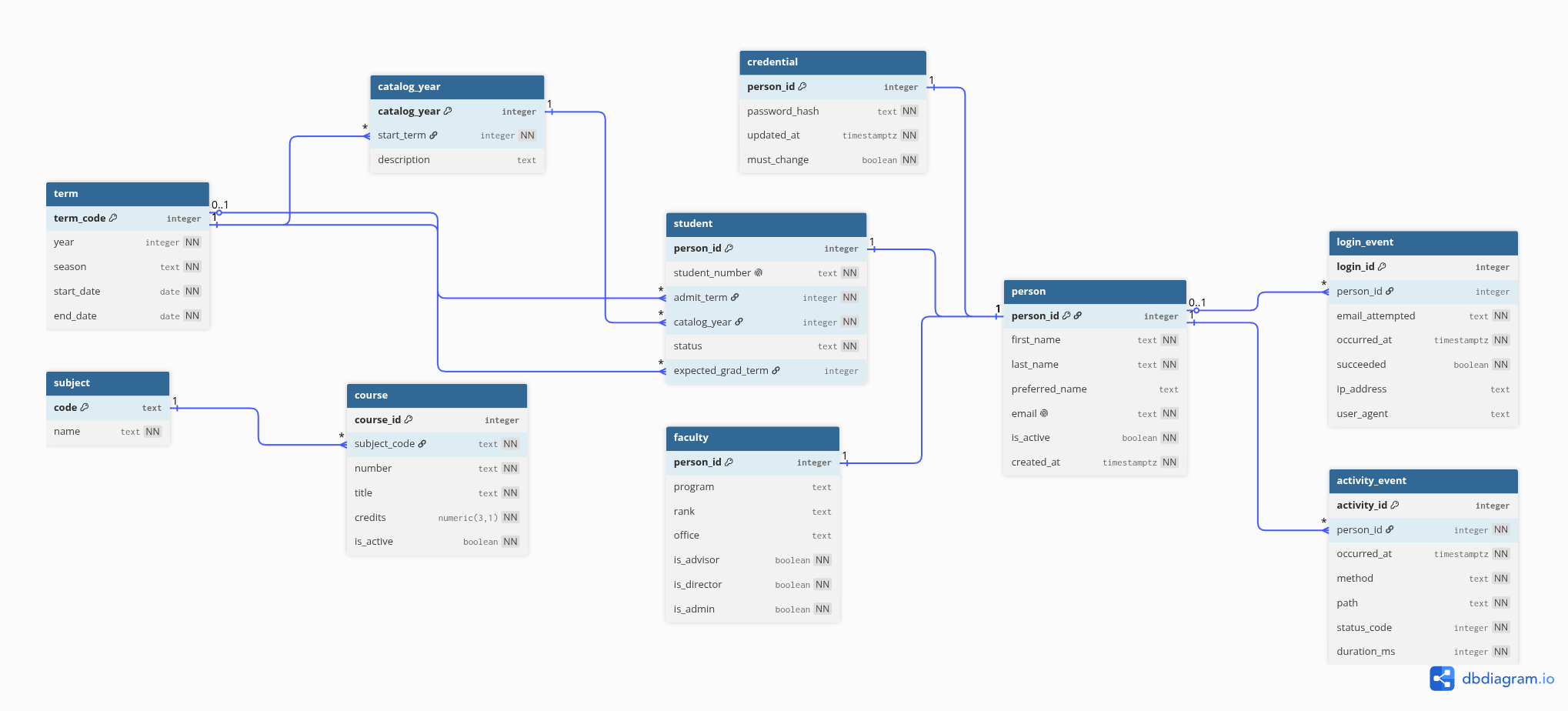
Changed for GP3
A few things changed after GP2, before anyone wrote a model class:
- The
facultytable is nowemployee, and it holds everyone who works for the department: instructional faculty, A&P faculty, and staff. If yourschema.dbmlhas afacultystub or a reference tofaculty.person_id, change it toemployee. employeehas akindcolumn, and itsrankcolumn is nowtitle, which fits staff too.personno longer has apreferred_name; its first and last name are the name a person goes by.- Columns with a fixed set of values, such as
term.seasonandstudent.status, are now enums.
The source files
- core.dbml – the full schema in DBML, which is what dbdiagram.io renders to produce the picture above
- core-stubs.dbml – the seven tables your own tables may point at, with primary keys only, to paste into your team's diagram so your foreign keys have something to point at
- models.py –
the SQLModel classes, which arrive in the class repository as
src/planner/core/models.py
Read core.dbml alongside the diagram.
Everything the picture shows is in that file, plus the column types and constraints that a picture cannot carry.
You will not need models.py until we get to SQLModel in October, but it is here now because it is what actually builds the tables.
Both files describe the same ten tables; if you ever find the two disagreeing, tell me, because one of them has a bug.
What the tables hold
| Table | One row is |
|---|---|
person |
one human known to the system |
credential |
one person's password hash, kept apart from their other data |
student |
one person who is pursuing a degree |
employee |
one person who works for the department, faculty or staff |
term |
one academic term, such as Fall 2026 |
catalog_year |
one edition of the undergraduate catalog |
subject |
one course prefix, such as CS or MATH |
course |
the stable identity of one course, independent of catalog year |
login_event |
one login attempt, successful or not |
activity_event |
one request made to the API |
A term is numbered the way MyMadison numbers it: a leading 1, two digits for the year, then one digit for the season, where 1 is Spring, 5 is Summer, and 8 is Fall. Examples: Fall 2026 is 1268; Spring 2027 is 1271.
A catalog year is named for the fall it takes effect, so 2026 means the 2026–27 catalog.
Reminder about foreign keys
As explained in the System Description ground rules:
- Your tables may reference the core schema.
- Your tables may not reference another team's tables.
This is what lets six teams work at once without waiting on each other. If you find yourself wanting a foreign key into another area, say so in your GP1 document rather than working around it quietly.
A few details worth noticing
person is a supertype.
A person is a student if a student row exists, and an employee if an employee row exists, so nobody needs a column saying which they are.
A person can be both, and a person can be neither.
An employee's kind is one of the three the university uses: instructional faculty, administrative and professional (A&P) faculty, and administrative staff.
The authorization flags is_advisor, is_director, and is_admin live on employee, not on person, because only employees hold those roles, and an employee of any kind may.
The email address is what identifies a person, and the login name. The first and last name are the name the person goes by, kept apart so that a list can be sorted by either.
There is no session table.
How long someone spent in the application is worked out afterward from activity_event, by grouping one person's requests and starting a new visit whenever the gap between them gets large enough.
The title and credits columns on course hold current values, so that you can display a course without joining through a catalog year.
Anything that varies by catalog year belongs to the course catalog team.
The data in the core tables
The core tables arrive full.
Courses, terms, catalog years, and the department's employees are real, and come from files in the class repository's src/planner/core/data/, each with the script that made it and a README saying where it came from.
About 300 students are generated, along with a password for everyone and eight weeks of logins and activity.
The same directory holds the real catalog, four editions of it, and the sections CS and IT have offered since Fall 2023, for the teams whose own data starts there.