HW3: Relational Mapping
Due: Monday, Sep 28th

Image source:
dbdiagram.io
An EER model says what the data means. A relational schema says how it is stored. Getting from one to the other follows well-defined rules, with only a handful of real decisions along the way. In this assignment you will map an entire EER model by hand, writing DBML in dbdiagram.io, and explain each decision you made.
Objectives
- Map an EER model to a relational schema using the six mapping categories.
- Write DBML by hand: tables, data types, primary keys, and references.
- Justify the design decisions that the mapping rules leave open.
The EER Model
The following EER model represents a small veterinary clinic:
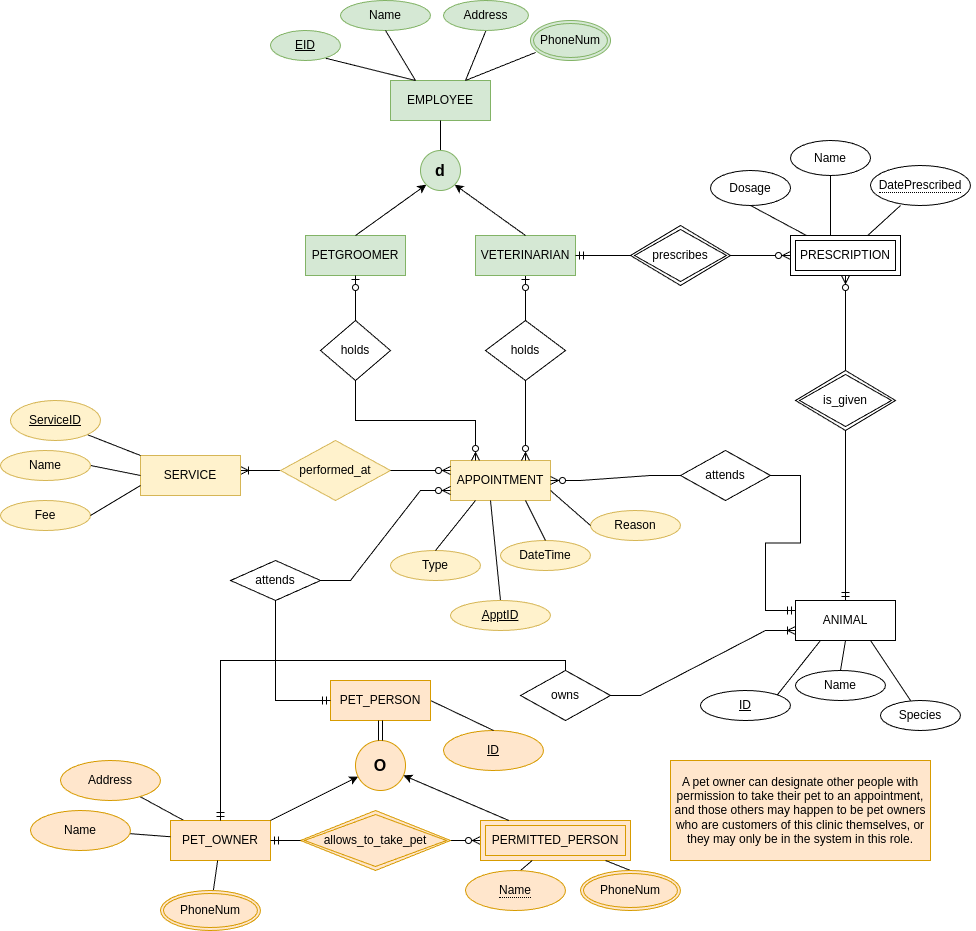
Read it carefully before you type anything.
In particular, find the two specialization hierarchies, the two weak entities, the three multivalued attributes, and the one N-to-M relationship.
Note that PERMITTED_PERSON is both a weak entity and a subclass, and that both holds relationships are optional.
Instructions
Step 1: Set up your diagram.
Download the provided template. Read and follow the instructions at the top of the file.
Open dbdiagram.io, sign in, and create a new diagram from the menu under the logo (top left). Replace the sample diagram in the left-hand editor with the contents of the template.
Step 2: Map the model, one category at a time.
Work in the same order as the Thursday's lab, which walks through each category with a different model. Thursday's slides state the rules.
- Use the names from the EER model, written in lowercase with underscores (
pet_id,date_prescribed). - Do not invent attributes and do not drop any, except where a specialization hierarchy forces it.
- Give every column a data type that fits its data. Identifiers, names, dates, and money are not all the same thing.
- Every table needs a primary key.
Declare a composite key in an
indexesblock. - Add the foreign key columns and the references that go with them.
A foreign key with no
Refis not a relationship.
Watch the diagram as you type. If a table or a relationship line is missing from the picture on the right, something is wrong with the DBML on the left.
Step 3: Explain your decisions.
A few points in this model have more than one defensible mapping, starting with the two specialization hierarchies.
Wherever you had to choose, attach a DBML Note to the table your choice affected, and say in a sentence or two what you chose and why.
These notes are a large part of the grade: they are how we tell a considered decision from a lucky one.
Submission
Select everything in the left-hand editor, copy it, and save it in a file named hw3.dbml.
Upload that file to the HW3 assignment on Gradescope.
There is no limit on the number of submissions and no penalty for excessive submissions. Points will be allocated as follows:
| Criterion | Points | Details |
|---|---|---|
| Autograder | 30 pts | Partial Credit Possible |
| Instructor Review | 70 pts | Partial Credit Possible |
What the autograder does and does not do
The autograder runs a few high-level checks: that the file is valid DBML, that the number of tables is in a plausible range, that every table has a primary key, that no table is left unconnected, that you didn't solve a multivalued attribute with numbered columns, and that you wrote your notes.
It does not check whether your mapping is correct. That is graded by hand after the due date, and it is worth more than twice as much.
So read the autograder output as a smoke test: it tells you whether your file is worth reading, not whether your model is right. A perfect 30 with a wrong mapping is still a low grade.