Activity: Graphs
Learning Objectives:
- Know the definition of a graph and its components.
- Represent graphs using adjacency matrices.
- Traverse graphs using depth-first search (DFS) and breadth-first search (BFS).
Time to Complete: 50 minutes
Submission: Submit individual PDF to Canvas
Instructions:
For these activities, follow the steps closely. Your goal is to complete all parts of the activity within the time provided.
If a section is hidden behind a "Continue" button, you should make sure that you have completed the previous sections and answered any questions before moving on. Do not skip ahead or reveal any solution until you have completed the previous steps.
Collaboration Encouraged
I encourage you to work with a partner or in a small group (no more than three) for in-class activities! Feel free to divvy up roles, compare solutions, and learn from each other.
If the assignment requires you to submit your work, make sure to include the names of all team members in the submission.
Worksheet
For this activity, there is also a worksheet that you should print out and draw on while solving some of the problems:
Part 1: Graph Definitions
(15 min)
-
This graph illustrates the prerequisite structure for eight CS courses at JMU:
graph TD cs149(0 - CS149) cs159(1 - CS159) cs227(2 - CS227) cs240(3 - CS240) cs261(4 - CS261) cs327(5 - CS327) cs330(6 - CS330) cs345(7 - CS345) cs149-->cs159 cs159-->cs345 cs159-->cs240 cs227-->cs240 cs227-->cs261 cs227-->cs327 cs240-->cs327- Each vertex is a course with an ID. For instance CS149 has ID 0.
- Notice that some vertices are not connected. This is fine for a graph. Not all vertices need to be connected.
-
Answer the following questions about the graph above:
-
Is this graph directed or undirected?
-
Is this graph cyclic or acyclic?
-
Would you describe this graph as 'sparsely' or 'densely' connected?
Solutions
- This graph is directed because the edges have a direction (e.g., CS149 -> CS159).
- This graph is acyclic because it does not contain any cycles.
- This graph is sparse because it has fewer edges than the maximum possible number of edges.
-
-
Let's consider the degree of vertices, which is the number of edges connected to a vertex.
- However, in a directed graph, we have two types of degrees: in-degree and out-degree.
- The in-degree of a vertex is the number of edges that point to the vertex.
- The out-degree of a vertex is the number of edges that originate from the vertex.
-
What is the in-degree of CS240?
-
What is the out-degree of CS240?
Solutions
- The in-degree of CS240 is 2 because CS159 and CS227 have edges pointing to CS240.
- The out-degree of CS240 is 1 because CS240 has an edge originating from it to CS327.
- However, in a directed graph, we have two types of degrees: in-degree and out-degree.
-
Now, consider this graph:
graph LR A((A)) B((B)) C((C)) D((D)) A---B A---C B---D C---D A---D B---C -
Answer the following questions about the graph above:
-
Is this graph directed or undirected?
-
Is this graph fully connected?
-
Is this graph cyclic or acyclic?
-
How many edges are in this graph?
-
Would you describe this graph as sparse or dense?
Solutions
- This graph is undirected because the edges do not have a direction.
- This graph is fully connected because every vertex is connected to every other vertex.
- This graph is cyclic because it contains a cycle (e.g., A -> B -> C -> A).
- This graph has 6 edges.
- This graph is dense.
-
-
What is unique about this graph?
- Consider the edges between the vertices.
Solution
Every vertex is connected to every other vertex in this graph.
-
This is known as a complete graph.
- In a complete graph, every vertex is connected to every other vertex by an edge.
- It has the maximum number of edges possible for the number of vertices.
-
Note that the degree of each vertex in a complete graph is the same.
-
What is the degree of each vertex in the graph above?
-
Generalize: In a complete graph with n vertices, what is the degree of each vertex?
Solution
- The degree of each vertex in the graph above is 3.
- In a complete graph with n vertices, the degree of each vertex is n-1.
-
-
A subgraph is a subset of the vertices and edges of a graph.
-
For example, this is a subgraph of the complete graph above:
graph LR
    A((A))
    B((B))
    C((C))

    A---B
    B---C
    A---C
-
-
A clique is a subgraph in which every vertex is connected to every other vertex.
- The subgraph above is a clique.
- A clique is itself a complete graph.
-
Consider this graph:
graph LR A((A)) B((B)) C((C)) D((D)) A---B B---C C---D B---D-
Does this graph contain a clique? If so, which vertices are in the clique?
Solution
Yes, this graph contains a clique (B, C, D).
-
-
Finally, let's think more about paths. A path is a sequence of vertices in which each vertex is connected to the next by an edge.
- In a path, each vertex is visited only once.
- For example, in the graph below, a path from A to E is A → B → E.
graph LR A((A)) B((B)) C((C)) D((D)) E((E)) A---B B---E A---C C---D D---E-
What is the length of that path? (count the number of edges)
-
What is the length of the longest path from A to E?
Solutions
- The length of the path from A to E is 2.
- The length of the longest path from A to E is 3. (A → C → D → E)
-
A graph can also be weighted, meaning that each edge has a value associated with it.
- For example, consider this weighted graph:
graph LR A((A)) B((B)) C((C)) D((D)) A---|2|B A---|3|C B---|1|D C---|4|D-
What is the weight of the path from A to D through B?
-
What is the weight of the path from A to D through C?
Solutions
- The weight of the path from A to D through B is 3.
- The weight of the path from A to D through C is 7.
-
We use these weights to describe things like distances, costs, or time.
- For example, in a transportation network, the weights could represent the distance between two locations.
- In a social network, the weights could represent the strength of a relationship between two people.
-
In this graph, vertices represent cities, and edges represent flights between cities, with the cost of the flight as the weight:
graph LR A[Seattle] B[Los Angeles] C[Denver] D[Chicago] E[Atlanta] F[D.C.] A---|$100|B A---|$100|C B---|$200|D C---|$100|D D---|$200|E E---|$100|F C---|$500|F-
What is the cheapest way to fly from Seattle to D.C.?
-
How much would it cost?
Solutions
- The cheapest way to fly from Seattle to D.C. is Seattle → Denver → Chicago → Atlanta → D.C.
- That's a lot of layovers!
- It would cost $100 + $100 + $200 + $100 = $500.
- The cheapest way to fly from Seattle to D.C. is Seattle → Denver → Chicago → Atlanta → D.C.
-
Part 2: Adjacency Matrices and Lists
(15 min)
-
Take a look at this undirected graph:
graph LR A((A)) B((B)) C((C)) D((D)) A---B A---C B---C C---D -
You can represent this graph using an adjacency matrix:
A B C D A 0 1 1 0 B 1 0 1 0 C 1 1 0 1 D 0 0 1 0 -
Take a few minutes to understand how the adjacency matrix is constructed.
-
What do the rows and columns represent in the matrix?
-
What do the values in the matrix represent (0 vs 1)?
Solutions
- The rows and columns represent the vertices in the graph.
- The values in the matrix represent whether there is an edge between the source and destination vertices.
- A value of 1 indicates an edge, while a value of 0 indicates no edge.
-
-
Now, consider this directed graph:
graph LR A((A)) B((B)) C((C)) D((D)) A-->B A-->C B-->C C-->D -
You can represent this graph too using an adjacency matrix:
A B C D A 0 1 1 0 B 0 0 1 0 C 0 0 0 1 D 0 0 0 0 -
Answer the following questions about the adjacency matrix above:
-
What do the rows represent in the matrix?
-
What do the columns represent in the matrix?
-
What do the values in the matrix represent (0 vs 1)?
Solutions
- The rows represent the source vertices.
- The columns represent the destination vertices.
- The values in the matrix represent whether there is an edge from the source row to the destination column.
- A value of 1 indicates an edge, while a value of 0 indicates no edge.
-
-
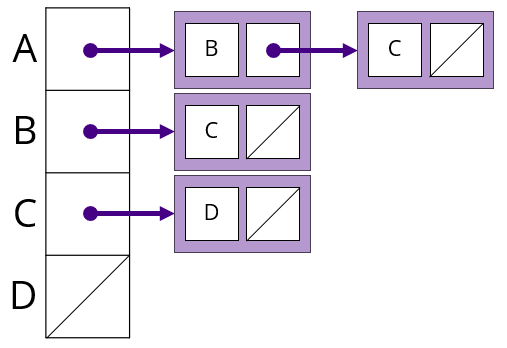
We can also represent a graph using an adjacency list.
- An adjacency list is a collection of linked lists. You can think of it as an array of linked lists.
- Each linked list represents the neighbors or possible destinations of a vertex.
-
For the directed graph above, the adjacency list would look like this:
-
What is the advantage of using an adjacency list over an adjacency matrix?
Solution
The adjacency list is more space-efficient than the adjacency matrix for sparse graphs.
-
-
Now, consider our prerequisite graph from before:
graph TD cs149(0 - CS149) cs159(1 - CS159) cs227(2 - CS227) cs240(3 - CS240) cs261(4 - CS261) cs327(5 - CS327) cs330(6 - CS330) cs345(7 - CS345) cs149-->cs159 cs159-->cs345 cs159-->cs240 cs227-->cs240 cs227-->cs261 cs227-->cs327 cs240-->cs327-
What is the adjacency matrix for this graph?
- You can leave cells blank instead of marking them as 0.
Solutions
Adjacency Matrix: (First row and column are for clarity. They would not be stored in memory)
0 1 2 3 4 5 6 7 0 (CS149) 1 1 (CS159) 1 1 2 (CS227) 1 1 1 3 (CS240) 1 4 (CS261) 5 (CS327) 6 (CS330) 7 (CS345) -
-
What is the adjacency list for this graph?
Solutions
Adjacency List:
0: 1
1: 3, 7
2: 3, 4, 5
3: 5
4:
5:
6:
7:
-
Given this adjacency matrix, draw the resulting graph:
A B C D A 0 1 1 1 B 0 0 1 0 C 0 0 0 1 D 1 0 0 0 - Draw your graph on the provided handout.
-
What is the in-degree of vertex A?
-
What is the out-degree of vertex A?
-
What is the in-degree of vertex C?
-
What is the out-degree of vertex C?
Graph
graph LR
    A((A))
    B((B))
    C((C))
    D((D))

    A-->B
    A-->C
    A-->D
    B-->C
    C-->D
    D-->A
Solutions
- The in-degree of vertex A is 1.
- The out-degree of vertex A is 3.
- The in-degree of vertex C is 2.
- The out-degree of vertex C is 1.
Part 3: Graph Traversal
(20 min)
While a graph can store a list of its vertices, we care less about the vertices themselves and more about the relationships between them.
- We will often need to "traverse" graphs based on a starting vertex and the graph's edges.
- There are two common ways to traverse a graph: depth-first search (DFS) and breadth-first search (BFS).
-
Consider this graph:
graph LR A((A)) B((B)) C((C)) D((D)) E((E)) F((F)) A-->B A-->C B-->D C-->D D-->E D-->F- You should have been provided this graph on paper as well.
-
Here is the (pseudocode) for depth-first search (DFS):
- Imagine each vertex has a boolean value to indicate if it has been visited.
void traverseDFS(Graph g, Vertex start) { // Initialize all vertices as not visited for (Vertex v : g) { // "For each vertex v in the graph g" v.visited = false; } // Traverse the graph DFS(start); } void DFS(Vertex v) { // For a PRE-visit, process the vertex here v.visited = true; for (Vertex neighbor : v.neighbors) { if (!neighbor.visited) { DFS(neighbor); } } // For a POST-visit, process the vertex here }- Note how a PRE-visit is when you first encounter the vertex, and a POST-visit is when you finish processing the vertex AND its neighbors (aka leaving the vertex for good).
-
Consider a PRE-visit, as shown in the pseudocode above, to be when you first encounter the vertex.
- Assume that each vertex's neighbors are returned in alphabetical order (e.g., A, B, C, D, E, F).
- The neighbors are the vertices that can be directly reached from the current vertex.
-
As you trace through the code, you can mark each vertex visited by putting a checkmark next to it.
- For a pre-visit, this is when you should print/process the vertex.
-
What are the neighbors of the starting vertex A, in alphabetical order?
Solution
B, C
-
What is the order of vertices visited using DFS starting at A, using a PRE-visit?
Solution
Hang on, we'll get to this in the next step!
- Assume that each vertex's neighbors are returned in alphabetical order (e.g., A, B, C, D, E, F).
-
Go to VisuAlgo's Graph Traversal Visualizer.
-
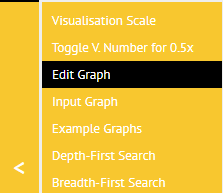
First, click on the "Edit Graph" option in the lower-left:
-
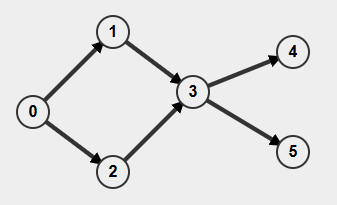
Clear the existing graph, then click to add vertices and click-and-drag to add edges, so that the graph looks like this:
-
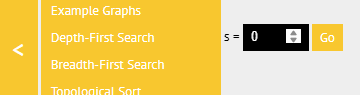
When you're done, click "Done", then select "Depth-First Search". Enter 0 as the starting vertex and then click "Go":
-
What is the order of vertices visited using DFS starting at A, using a PRE-visit?
Solution
0, 1, 3, 4, 5, 2
aka
A, B, D, E, F, C
-
-
Play around with the visualizer a bit to understand how DFS works.
- Try different starting vertices and observe the order of visited vertices.
- Try different graphs and see how the order changes.
-
Summarize how DFS works in your own words.
Solution
Take your starting vertex and visit its first neighbor. Then visit that neighbor's first neighbor, and so on, until you reach a dead end. Then backtrack and visit the next neighbor of the previous vertex.
Aka, go as deep as you can through the graph, then back up and go deep again.
-
Here is the (pseudocode) for breadth-first search (BFS):
void traverseBFS(Graph g, Vertex start) { // Initialize all vertices as not visited for (Vertex v : g) { // "For each vertex v in the graph g" v.visited = false; } // Traverse the graph BFS(start); } void BFS(Vertex start) { Queue<Vertex> toVisit = new Queue<>(); toVisit.add(start); start.visited = true; while (!toVisit.isEmpty()) { Vertex current = toVisit.remove(); // For a PRE-visit, process the vertex here for (Vertex neighbor : current.neighbors) { if (!neighbor.visited) { toVisit.add(neighbor); neighbor.visited = true; } } // For a POST-visit, process the vertex here } }- Note how BFS uses a queue to keep track of which vertices to visit next.
-
Trace through the BFS code, using the same graph.
- Again, assume that each vertex's neighbors are returned in alphabetical order (e.g., A, B, C, D, E, F).
- As you trace through the code, you can mark each vertex visited by putting a checkmark next to it.
-
You can put things in the queue and cross them out as you remove them.
-
What are the neighbors of vertex D, in alphabetical order?
Solution
E, F
-
What is the order of vertices visited (PRE-visit) using BFS starting at A?
Solution
Hang on, we'll get to this in the next step!
-
Go back to the VisuAlgo Graph Traversal Visualizer.
-
Again, click on "Edit Graph" and replicate the graph from before.
-
This time, select "Breadth-First Search". Again enter 0 as the start vertex.
-
What is the order of vertices visited using BFS starting at A?
Solution
0, 1, 2, 3, 4, 5
aka
A, B, C, D, E, F
-
-
Play around with the visualizer a bit to understand how BFS works.
- Try different starting vertices and observe the order of visited vertices.
- Try different graphs and see how the order changes.
-
Summarize how BFS works in your own words.
Solution
Start at your vertex and visit all of its neighbors. Then visit all of their neighbors, and so on, until you've visited every vertex at that level. Then move on to the next level and repeat.
Aka, go wide through the graph, visiting all neighbors of a vertex before moving on to the next vertex.
-
Now, perform both a DFS and BFS on the prerequisite graph from before. You can find it on your worksheet.
- Here, assume neighbors and vertices are returned in order of their index. (e.g., 0, 1, 2, 3, 4, 5, 6, 7)
-
Since some vertices are not reachable from others, you should call DFS or BFS on each vertex that has not been visited afterwards. Consider this modification:
void traverseDFS(Graph g, Vertex start) { // Or traverseBFS // Initialize all vertices as not visited for (Vertex v : g) { // "For each vertex v in the graph g" v.visited = false; } // Traverse the graph DFS(start); // Or BFS(start) // Visit any disconnected vertices for (Vertex v : g) { if (!v.visited) { DFS(v); // Or BFS(v) } } } -
What is the order of vertices visited using DFS starting at CS149?
-
What is the order of vertices visited using BFS starting at CS149?
Solution
- DFS: 0 (149), 1 (159), 3 (240), 5 (327), 7 (345), 2 (227), 4 (261), 6 (330)
- BFS: 0 (149), 1 (159), 3 (240), 7 (345), 5 (327), 2 (227), 4 (261), 6 (330)
- Note that some vertices are not reachable from others.
- For example, CS330 is not reachable from CS149.
- There are variations of DFS and BFS that can handle disconnected graphs.
- Typically, you would call DFS or BFS on each vertex that has not been visited.
- The OpenDSA implementation of BFS and DFS does this.
-
Finally, let's do some traversals on an undirected graph:
graph LR A((A)) B((B)) C((C)) D((D)) E((E)) F((F)) A---B A---D B---C C---E B---F B---D -
Perform both a DFS and BFS on this graph, starting at vertex A.
- Again, assume that each vertex's neighbors are returned in alphabetical order.
-
What is the order of vertices visited using DFS starting at A?
-
What is the order of vertices visited using BFS starting at A?
Solution
- DFS: A, B, C, E, D, F
- BFS: A, B, D, C, F, E
- Consider a BFS starting at vertex B instead.
-
What is the order of vertices visited using BFS starting at B?
Solution
B, A, C, D, F, E
-
Submission
For these activities, you will typically submit a PDF report to Canvas. First, click the "Export as PDF" button below.
Then, submit the PDF to Canvas. Everyone must submit their own copy to receive credit.