Activity 3: MyArrayList
Learning Objectives:
- Implement an
Iterablecollection class and its iterator - Write and use inner classes to encapsulate implementation details
- Analyze the performance of different methods
Time to Complete: 40-50 minutes
Submission: Submit individual PDF to Canvas
Instructions:
For these activities, follow the steps closely. Your goal is to complete all parts of the activity within the time provided.
If a section is hidden behind a "Continue" button, you should make sure that you have completed the previous sections and answered any questions before moving on. Do not skip ahead or reveal any solution until you have completed the previous steps.
Collaboration Encouraged
I encourage you to work with a partner or in a small group (no more than three) for in-class activities! Feel free to divvy up roles, compare solutions, and learn from each other.
If the assignment requires you to submit your work, make sure to include the names of all team members in the submission.
Part 0: Pseudocode
(10 minutes)
Start by writing pseudocode for the unfinished methods in MyArrayList: WS_MyArrayList.pdf.
Solution
Part 1: Implement MyArrayList
(15 minutes)
-
Download the following code files:
- SimpleList.java - Interface for a simple list
- MyArrayList.java - Starter code for a custom
ArrayList - TestList.java - Test class for the
MyArrayList - TimeIt.java - Utility class to time performance
-
Put them together in a project and open them in your Java IDE.
- The files should be in a package called
labs.arraylist. - For VS Code, you don't need to create a project, just put them in the correct place and open the
cs240_sp25folder.
- The files should be in a package called
- Open
MyArrayList.javaand look at the constructor. It creates an array of typeEto store the elements of the list:- It looks fine, but there is an error.
- What is the error?
-
This error occurs because Java does not allow you to create an array of a generic type.
- Due to something called type erasure.
- This is fine for many cases, but not when you need to create an array of a generic type.
-
To fix this, you need to create an array of
Objectand cast it to the generic typeE:this.data = (E[]) new Object[100];- It should no longer have an error, but a warning instead.
-
You should now see a warning about "unchecked or unsafe operations." This is because Java can't guarantee that the cast is safe.
-
This is fine, but you should suppress the warning by adding
@SuppressWarnings("unchecked")above the constructor:@SuppressWarnings("unchecked") public MyArrayList() { ... } -
Click Compile to check if the warning is resolved.
Remember this pattern!
This is a common pattern when working with generics in Java. You will see it often in the future.
You rarely want to suppress warnings, but in this case, it's okay here because you know the cast is correct (and we're telling you to do it!).
Your constructor should now look like this:
@SuppressWarnings("unchecked") public MyArrayList() { this.data = (E[]) new Object[100]; this.size = 0; } -
-
Next, implement the remaining methods in
MyArrayList. Use your psuedocode to guide you!int size()void remove(int index)boolean contains(E e)
-
Once you have implemented all the methods, run the tests in
TestList.javato check your work.Solution
public class MyArrayList<E> implements SimpleList<E> {

    private E[] data;
    private int size;

    @SuppressWarnings("unchecked")
    public MyArrayList() {
        this.data = (E[]) new Object[100];
        this.size = 0;
    }

    @Override
    public void add(E e) {
        if (this.size == data.length) {
            return;
        }

        this.data[this.size] = e;
        this.size++;
    }

    @Override
    public E get(int index) {
        return this.data[index];
    }

    @Override
    public void clear() {
        this.size = 0;
    }

    @Override
    public int size() {
        return this.size;
    }

    @Override
    public void remove(int index) {
        for (int i = index; i < this.size - 1; i++) {
            this.data[i] = this.data[i + 1];
        }
        this.size--;
    }

    @Override
    public boolean contains(E e) {
        for (int i = 0; i < this.size; i++) {
            if (this.data[i].equals(e)) {
                return true;
            }
        }
        return false;
    }
}
Part 2: Iterable and Iterator
(15 minutes)
- Next, we will implement the
Iterableinterface inMyArrayList.- We will make
MyArrayListimplementIterable<E>, which means that it can be used in a "for-each" loop, and that it will iterate over elements of the same typeE. - The
Iterableinterface requires you to implement a method callediterator().
- We will make
Iterable vs. Iterator
- The Iterable interface means that you can iterate over this object, either with a for-each loop or using an iterator.
- An ArrayList is an Iterable collection.
- An Iterator is an object that visits each element in a collection, one at a time.
- It should keep track of where it is in the collection and know how to move to the next element.
It's like a board game! The game board is the collection, and the player piece is the iterator. The player knows where they are on the board and how to move to the next square.

- Make the following changes to your code:
- Import the
Iteratorclass at the top of your file:import java.util.Iterator; - In the class declaration, add
implements Iterable<E>:public class MyArrayList<E> implements SimpleList<E>, Iterable<E> { - Then add the
iterator()method toMyArrayList:@Override public Iterator<E> iterator() { return null; }
- Import the
- What should you return in the
iterator()method?- An instance of an iterator... but we don't have an iterator class yet!
- We need to write a new class that implements the
Iterator<E>interface! - This class should be an inner class of
MyArrayList(a class inside another class).
- We need to write a new class that implements the
- An instance of an iterator... but we don't have an iterator class yet!
Inner Classes?
Inner classes are classes defined within another class. Yes, you can do that in Java!
Why would you want to do this?
- Encapsulation: The inner class can access the private fields of the outer class.
- Readability: The inner class can only be used by the outer class, so it's really a "utility class" that should be kept in the same file.
- At the bottom of the
MyArrayListclass (but still inside the class -- just like a method), add a new private inner class calledMyArrayListIteratorthat implementsIterator<E>:public class MyArrayList<E> implements SimpleList<E>, Iterable<E> { ... private class MyArrayListIterator implements Iterator<E> { } }
-
The
Iteratorinterface requires you to implement two methods:boolean hasNext()E next()
Remember How Iterators Are Used
This is how you would use an iterator:
Iterator<String> iter = list.iterator(); while (iter.hasNext()) { String current = iter.next(); ... } -
MyArrayListIteratorwill need to iterate over the elements in thedataarray.- Here's what every iterator should do:
- Keep track of its current position with a private instance variable.
next()should return the element at the current position and then move to the next one.hasNext()should check if our current position is valid.
- Let's start by doing the following:
- Add a private instance variable to
MyArrayListIteratorto keep track of the current index. - Add a constructor to initialize this index to 0.
- Add a private instance variable to
Solution
private class MyArrayListIterator implements Iterator<E> { private int index; public MyArrayListIterator() { this.index = 0; } } - Here's what every iterator should do:
-
Implement the
hasNext()andnext()methods inMyArrayListIterator.hasNext()should returntrueif the current index is less than the current size of the list.next()should return the element at the current index and increment the index.
Hint
You can access any variable or method in the outer class from the inner class.
You can still just refer to
dataandsizedirectly in the inner class. However, if needed, you can also useMyArrayList.this.dataandMyArrayList.this.sizeto be more explicit.In the inner class,
thisrefers to the inner class, whileMyArrayList.thisrefers to the outer class.Solution
private class MyArrayListIterator implements Iterator<E> {
    private int index;

    public MyArrayListIterator() {
        index = 0;
    }

    @Override
    public boolean hasNext() {
        return index < size;
    }

    @Override
    public E next() {
        E element = data[index];
        index++;
        return element;
    }
}
-
Finally, in the
iterator()method ofMyArrayList, return a new instance ofMyArrayListIterator:@Override public Iterator<E> iterator() { return new MyArrayListIterator(); } -
In
TestList.java, uncomment thetestIterable()method at the bottom and then run the tests to make sure it all works!
Takeaway
You have now implemented an Iterable collection class and a custom Iterator (as an inner class)!
You will be writing many more iterators in the future, so make sure you understand how this works and use this as an example.
Part 3: Performance Analysis
(10 minutes)
- Now, let's analyze the performance of the
MyArrayListclass. Let's see how long it takes to add, remove, and search for elements in the list, based on how many elements are already in the list.
-
Open up
TimeIt.java. This class contains amainmethod, so you can run this file. -
Take a quick look at the code to understand how it works.
- The
runTimeTests()method will create aMyArrayListof a given size, initialized with random numbers. - It will then time how long it takes to run the
functionToTest()method on the list. - Right now, the
functionToTest()method is set to add a single element to the list.
- The
-
Run the program by clicking Run. It will print out a list of XY coordinates, where X is the size of the list and Y is the time it took to run the method (in microseconds).
-
How long (in microseconds) did it take to add an item for a list of size 10?
-
How long did it take to add an item for a list of size 20?
-
-
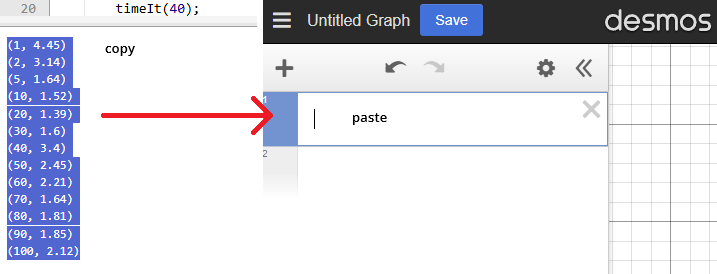
Select and copy the entire list of XY coordinates from the output.
- Go to the Desmos Graphing Calculator website.
- In the list on the left, paste the XY coordinates you copied.
-
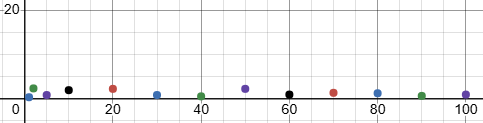
You should see a scatterplot of the data points. Zoom out to see the entire graph.
Example
-
What do you notice about the shape of the graph?
-
What do you think this means about the performance of the
addmethod as the list gets bigger?Solution
You should find that adding an element takes the same amount of time, regardless of the size of the list.
-
-
In
functionToTest(), replace the call tolist.add()with a call tolist.remove(0)(removing the first item in the list).-
How long did it take to remove the first item from a list of size 10?
-
How long did it take to remove the first item from a list of size 20?
-
-
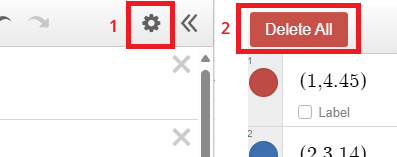
Go back to Desmos and clear the list of XY coordinates by clicking the gear icon and selecting "Delete All".
-
Now, copy the new list of XY coordinates from the output and paste it into Desmos to create another graph.
Example
-
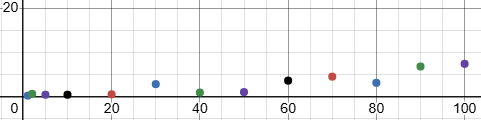
What do you notice about the shape of this graph? (Also take a look at the values.)
-
What do you think this means about the performance of
remove(0)as the list gets bigger?Solution
You should find that removing the first element takes longer as the list gets bigger.
-
Think: What would the graph will look like if you change the code to remove the last element instead of the first?
-
- To test your understanding, make the following changes:
- Replace the call to
list.remove(0)with a call tolist.remove(list.size() - 1)(removing the last item in the list). - Plot your results in Desmos and compare the graph to the previous two.
-
Were you right? What do you notice about the shape of this graph?
Solution
You should find that removing the last element takes the same amount of time, regardless of the size of the list.
- Replace the call to
-
Finally, replace the code in
functionToTest()withlist.contains(0)(searching for the number 0 in the list). Also update the graph in Desmos.-
How long did it take to search for the number 0 in a list of size 10?
-
How long did it take to search for the number 0 in a list of size 20?
-
What do you notice about the shape of this graph?
-
Think: Would the time taken depend on the contents of the list?
Solution
This one is a bit tricky! The time taken to search for an element will depend on where the element is in the list. If the element is at the beginning, it will take less time than if it is at the end.
Because the list is filled with random numbers, the time taken will vary.
-
-
Great job! You have now analyzed the performance of the
MyArrayListclass. You will learn more about performance analysis in future activities. -
If you have time, feel free to experiment with the code and see how the performance changes with different methods. Try the following:
list.contains(-1)(searching for a number not in the list)list.clear()(clearing the list)list.get(0)(getting the first element in the list)list.get(list.size() - 1)(getting the last element in the list)list.size()(getting the size of the list)
Takeaway
We learned how different algorithms can have different performance characteristics and change based on the size of the input.
In this case, adding an element to a list takes the same time, regardless of the size of the list. However, removing the first element gets slower as the list gets bigger.
Empirical Analysis Is Not Always Accurate
In this activity, we used empirical analysis to measure the performance of our methods. This is a good way to get a rough idea of how long things take, but it is not always accurate.
You may have noticed that the time taken can vary a lot, even for the same size list. This is because there are many factors that can affect the time taken, such as the speed of your computer, other programs running, etc.
In the future, you will learn about more accurate ways to analyze the performance of algorithms.
Submission
For these activities, you will typically submit a PDF report to Canvas. First, click the "Export as PDF" button below.
Then, submit the PDF to Canvas. Everyone must submit their own copy to receive credit.