Create and fill database
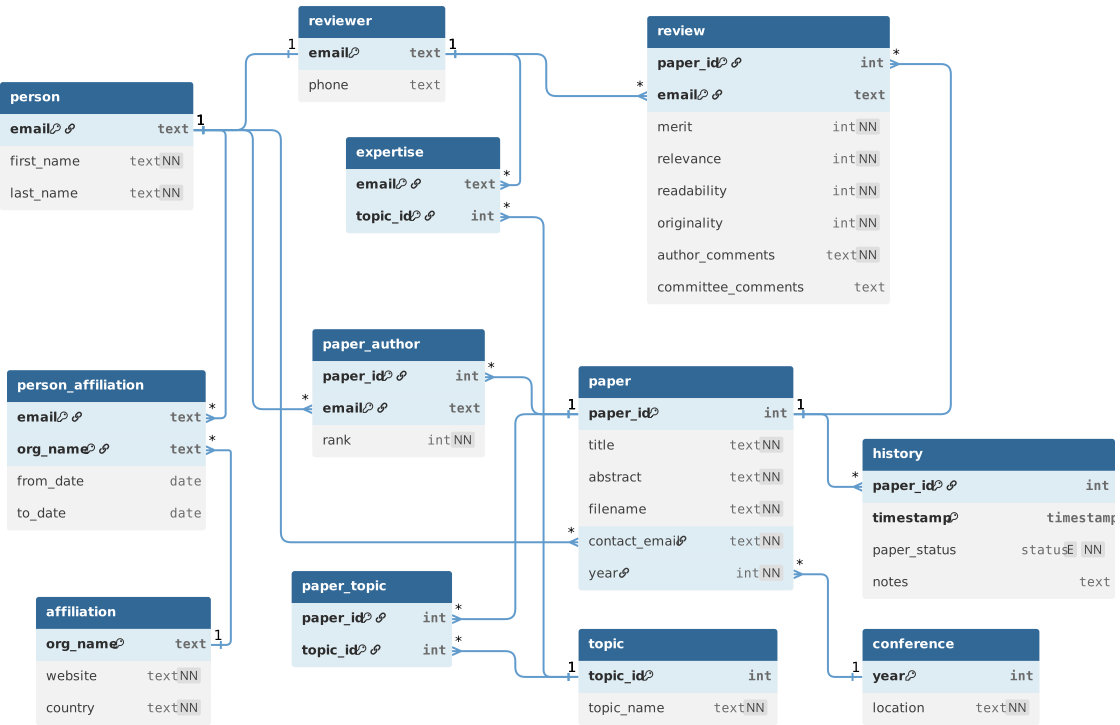
In the EER to Relational Mapping lab, you created a MySQL Workbench model for the Conference Review System. It could have also been created in dbdiagram.io. The database diagram below is a further iteration of that design that features additional tables, column constraints, and custom data types. In this assignment, you will create this database on the PostgreSQL server and use Faker to load the database with test data.
Objectives
- Write SQL scripts for creating and dropping database tables/types.
- Write a Python script to generate data.
Part 1: Write Create Script
- Create a
crsfolder for this assignment – you will have multiple files in the end. - Open a new diagram in dbdiagram.io and paste the contents of crs.dbml, the source code for the above diagram.
- Export the diagram to PostgreSQL and rename the resulting file as
create.sql. Move the file to yourcrsfolder. - Run pgAdmin and open a Query Tool in the
sp26database. - Open the
create.sqlfile in pgAdmin and run the code. There should not be any errors, unless you missed a step. - Go to your schema in the
sp26database. Right click Tables and select Refresh. You should see 12 tables.
Part 2: Write Drop Script
- Open a terminal in your
crsfolder, and run this command. The output will be a list of theCREATEstatements.grep CREATE create.sql - Create a new file named
drop.sqland write aDROPstatement for eachCREATEstatement using this format:DROP TABLE IF EXISTS person; -
Open the
drop.sqlfile in pgAdmin and try running the script. If the code runs without errors, good for you!
- You will likely get constraint errors if your
DROPstatements are in the same order as the originalCREATEstatements. - Reorder the drop statements so that tables with
FOREIGN KEYconstraints are dropped before the tables they reference. - Hint #1: Search for all "
>" operators in the DBML source code to see which tables reference other tables.
- You will likely get constraint errors if your
-
Make sure you are able to run your
drop.sqlandcreate.sqlscripts, in that order, without getting errors.
Part 3: Generate Fake Data
- Create a new file named
fakedata.py. Write a docstring at the top, followed by your first and last name:"""Generate fake data for the Conference Review System.""" __author__ = "Your Name" -
Write a program to generate data for each of the tables.
- Be creative but realistic. The data values you choose should be reasonable for a Conference Review System.
-
The following table summarizes how much data you should generate for each of the tables.
Table Rows person 10 rows reviewer 5 rows affiliation 4 rows person_affiliation 8 rows conference 1 row paper 3 rows paper_author 8 rows review 3 rows history 5 rows topic 20 rows expertise 10 rows paper_topic 9 rows -
Develop your code incrementally and test as you go. For convenience, you should drop and recreate all tables at the start of your
main()function. That way, you won't have to deal with existing data left over from previous runs.
Submission
Submit the following files via Canvas:
drop.sqlfakedata.py