Prep 9: Events, Asynchronicity and Later Gator
Textbook Reading
- Web
- 2.3 Uniform Resource Locators
- 2.4 Hypertext Transfer Protocol
- HTML/CSS
- 7.1 Older Approaches to CSS Layout
- JS
- 10.3.0 Asynchronous Coding with JavaScript
- 10.3.1 Fetching Data from a Web API
- MDN: Working with JSON
🕐🐊 - Later Gator
We’ve begun the work of beginning event driven programming (a form of asynchronous programming) by adding event listeners such that certain code is invoked when other actions happened. Now we take it a step farther and start to build a bridge toward:
- Making HTTP Requests (and receiving their responses)
- Comparing and contrasting 3 different approaches to asynchronicity:
- Callbacks
- Promises
- async/await
Provided code
- Start by accepting the github classroom link form your instructor.
- There are several files in the repo github classroom creates for you for this assignment. You will do all of your work in
main.js. -
The provided
index.htmlalready includeslater.jsandmain.js, so when writing your code inmain.js, you can rely on the following provided functions (which are already finished, and provided bylater.js):You aren’t expected to read or understand
later.jsat this timeOf course, you’re welcome to explore the source code, but for this activity, completely understanding the implementation of the 2 provided functions is out of scope, you simply need to use them.
-
later(targetQuery, callback) - finds a valediction that is appropriate for a
targetQuery. It has two parameters:targetQuery- to whom you’d like to offer an appropriate valediction (if it is a substring of a known target, the corresponding valediction will be provided, otherwise a random one will be selected)
- e.g.
Hippos callback- function that you want later to call with the valediction result when it’s ready.
this function will be called with the following argument:
result- an object with the keys: target: to whom the result is intended to go valediction: what to say to the target
-
options(callback, query) - finds all known valediction targets or those that include the substring specified in
query, if it’s provided. It has two parameters:callback- function that you want options to call with the known valediction targets, when they’re ready.
This function will be called with the following argument:
keys- an array of known valediction targets
query- a constraint on which valediction targets to include. Only those of which query is a substring will be included.
-
Part 1
Make a little web app that
- has 2 user interface elements (these are actually provided):
- a text
<input>element - an
<output>element
- a text
- has a simple interaction of updating the
<output>when the user presses enter on the<input>
See Part 1 in action 🎬 or continue down for specific steps:
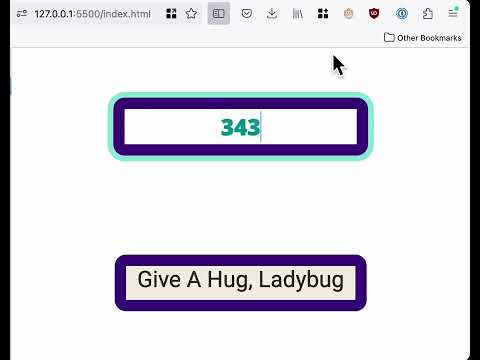
- find the
TODOitems guiding you to the areas to start editing for Part 1. - Update the event listener such that when the text input has focus and the user presses Enter:
- the text they’ve entered is used to search for a possible valediction
- use the provided
laterfunction
- use the provided
- that found valediction is displayed in the output element
- complete the setOutput function and use that.
- the text they’ve entered is used to search for a possible valediction
Part 2
See Part 2 in action 🎬 to quickly understand the changes (instead of directly showing a message, show possible matches and then show the message when one is selected):
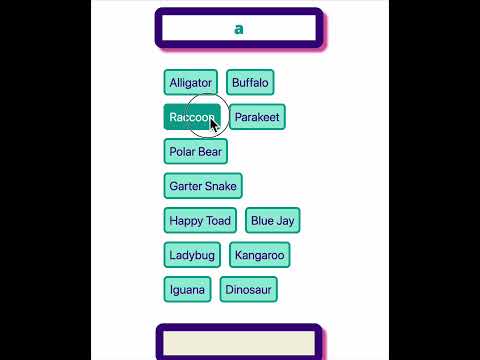
- Create a function called
makeOptions:- it has 1 parameter, an array of strings
- it removes any existing children of
#available-targets - for each string
sin the parameter, it creates a list item and adds it to the#available-targets. This list item has 1 child element:- a
<button>with that stringsas its content
- a
- Modify the code you have for Part 1 such that the user’s input is no longer used immediately to search for a single result, but instead is used to find several possible valediction targets.
- use the provided
optionsfunction.
- use the provided
- These matching targets are displayed as buttons
- use the
makeOptionsfunction you wrote - when one of the buttons is clicked, the valediction target displayed on the button is used to query for the corresponding valediction (similar to what you had in Part 1, use the provided
laterfunction)
- use the
- finally this valediction is displayed in the output element (use your
setOutputfunction).
Submit
Push your changes back to your github classroom repo and submit the main.js file to the corresponding gradescope submission.