Lab 10: Classes and Modules
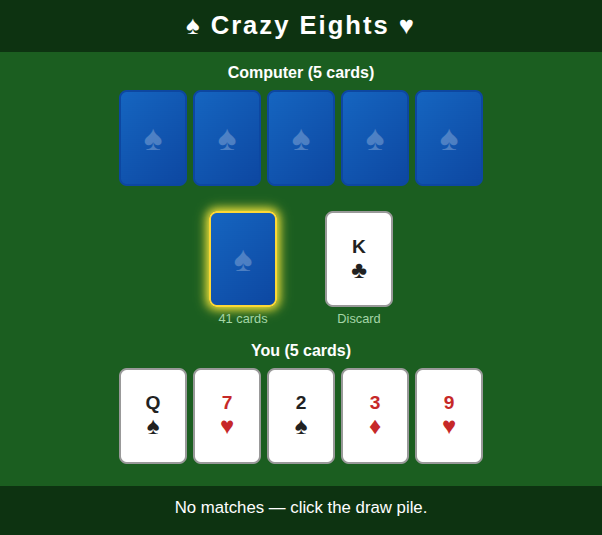
In this lab, you will implement a classic card game by writing five classes in two modules. The HTML, CSS, and user interface are provided!
Background
Crazy Eights is a classic card game for two or more players. The main objective is to be the first player to get rid of all your cards. Here’s how to play:
- Deal five or more cards to each player, and then deal one card face up to create the “discard pile”. Place the remaining cards face down to create the “draw pile”.
- Each player takes turns placing a single card on the discard pile. The card must match the rank or suit of the previously played card, or be an eight, which is a “wild card”.
- When players don’t have a matching card or an eight, they must draw new cards until they get one.
- If the draw pile ever runs out, the discard pile is shuffled (except the top card) and becomes the new draw pile.
- As soon as a player has no cards, the game ends, and all other players score penalty points for their remaining cards. Eights are worth 20, face cards are worth 10, and all others are worth their rank.
You can read https://en.wikipedia.org/wiki/Crazy_Eights for more details, but we have enough to get started.
Starter Code
Download the following files to get started:
- main.html – The game page (do not modify).
- eights.css – Styling and card visuals (do not modify).
- ui.js – DOM rendering and animation (do not modify).
You will create and submit two new JavaScript module files: cards.js and game.js.
Tip
Open main.html in a browser to play the game as you go.
The page will show errors in the console until both modules are fully implemented.
Tip
The provided ui.js file imports your classes like this:
import { Card, Deck, Hand } from "./cards.js";
import { Player, CrazyEights } from "./game.js";
Make sure you export every class so these imports work.
Tip
The following documentation pages may be helpful:
Module 1: cards.js
This module contains three general-purpose classes that can be used in any card game.
classDiagram
    class Card {
        +RANKS : string[]$
        +SUITS : string[]$
        +SUIT_SYMBOLS : object$
        -rank : string
        -suit : string

        +constructor(rank : string, suit : string)
        «get» rank : string
        «get» suit : string
        +matches(other : Card) boolean
        +tostring() string
    }

    class Deck {
        -cards : Card[]

        +constructor()
        «get» size : number
        «get» isEmpty : boolean
        +addCards(cards : Card[])
        +drawCard() Card
        +shuffle()
    }

    class Hand {
        -label : string
        -cards : Card[]

        +constructor(label : string)
        «get» label : string
        «get» cards : Card[]
        «get» size : number
        «get» isEmpty : boolean
        +addCard(card : Card)
        +getCard(index : Number) Card
        +removeCard(index : Number) Card
    }

    Deck --> Card : contains
    Hand --> Card : contains
The Card class
- Static properties (shared by all Card instances):
RANKS— An array of 13 rank strings:["A", "2", "3", ..., "10", "J", "Q", "K"]SUITS— An array of 4 suit strings:["clubs", "diamonds", "hearts", "spades"]SUIT_SYMBOLS— An object mapping each suit name to its Unicode symbol:{ clubs: "♣", diamonds: "♦", hearts: "♥", spades: "♠" }
- Private fields:
#rankand#suit, set in the constructor - Getters:
rankandsuitreturn the corresponding private fields - matches(other): Returns
trueif this card shares the same suit or same rank asother, or if this card’s rank is"8"(eights are wild) - toString(): Returns a short string like
"A♠"or"10♥"(rank + suit symbol)
The Deck class
- Private field:
#cards, an array ofCardobjects - constructor(): Creates an ordered deck of 52 cards (one for every combination of
Card.SUITSandCard.RANKS). The deck is not shuffled. - Getters:
sizereturns the number of cards;isEmptyreturnstruewhen the deck has no cards - addCards(cards): Pushes all cards in the given array onto the deck (use the spread syntax with
push()) - drawCard(): Removes and returns the last card in the array (use
pop()) -
shuffle(): Randomly rearranges the cards in place using the Fisher-Yates algorithm:
for i from n-1 down to 1:
    j = random integer in [0, i]
    swap cards[i] and cards[j]
Tip
Use
Math.floor(Math.random() * (i + 1))to generatej, and use destructuring assignment to swap:[a, b] = [b, a]
The Hand class
- Private fields:
#label(a string) and#cards(an array) - constructor(label): Creates a hand with the given label and empty cards array
- Getters:
label,size,isEmptywork as expected;cardsreturns a shallow copy of the internal array (use the spread syntax:[...this.#cards]) - addCard(card): Pushes a card onto the end of the hand
- removeCard(index): Removes and returns the card at
index(usesplice()) - getCard(index): Returns the card at
indexwithout removing it
Module 2: game.js
This module contains two classes specific to Crazy Eights.
classDiagram
    class Player {
        -name : string
        -hand : Hand

        +constructor(name : string)
        «get» name : string
        «get» hand : Hand
        +findMatch(topCard : Card) number
        +score() number
    }

    class CrazyEights {
        -deck : Deck
        -discardPile : Card[]
        -human : Player
        -computer : Player
        -currentPlayerIndex : number

        +constructor(humanName : string, computerName : string)
        «get» human : Player
        «get» computer : Player
        «get» topCard : Card
        «get» drawPileSize : number
        «get» currentPlayerIndex : number
        «get» isOver : boolean
        +drawCard() Card
        +playCard(card : Card)
        +computerTurn() object
        -reshuffle()
    }

    CrazyEights --> Player : manages
    CrazyEights --> Deck : uses
    Player --> Hand : has
The Player class
- Private fields:
#nameand#hand - constructor(name): Sets the name and creates a new empty
Handusing the name as the label - Getters:
namereturns the player’s name;handreturns theHandobject - findMatch(topCard): Loops through the player’s hand and returns the index of the first card that
matches()the giventopCard. Returns-1if no match is found -
score(): Returns the total penalty points for all cards remaining in the hand:
Rank Points 8 20 J, Q, K 10 each A 1 2–7, 9–10 Face value (use parseInt)
The CrazyEights class
- Private fields:
#deck,#discardPile(an array ofCard),#human,#computer,#currentPlayerIndex - constructor(humanName, computerName): Sets up a new game:
- Create and shuffle a new
Deck - Create two
Playerobjects (human and computer) - Deal 5 cards to each player by calling
this.#deck.drawCard()and adding each card to the player’s hand - Turn one card face-up to start the discard pile (draw one more card from the deck and store it in an array)
- Set
currentPlayerIndexto0(human goes first)
- Create and shuffle a new
- Getters:
humanandcomputerreturn the two playerstopCardreturns the last element of the discard pile arraydrawPileSizereturnsthis.#deck.sizecurrentPlayerIndexreturns0(human’s turn) or1(computer’s turn)isOverreturnstrueif either player’s hand is empty
- drawCard(): If the deck is empty, call
#reshuffle()first. Then draw and return one card from the deck. - playCard(card): Pushes the card onto the discard pile and switches the current player (toggle between
0and1) - computerTurn(): Executes the computer’s full turn:
- Look for a matching card in the computer’s hand using
findMatch() - If found, remove it from the hand and call
playCard() - If not found, repeatedly call
drawCard()until a match is drawn. Non-matching drawn cards are added to the computer’s hand. - Return an object
{ played: Card, drawn: Number }with the card that was played and how many cards were drawn
- Look for a matching card in the computer’s hand using
- #reshuffle(): A private method that saves the top card, moves all other discard-pile cards back into the deck using
addCards(), resets the discard pile to just the saved top card, and shuffles the deck
Submission
When you are finished, submit cards.js and game.js to Gradescope.