Quick Start Part 1: First API
3 minute read
Install
Add Django Ninja to your project:
uv add django-ninja
Just like uv add "channels[daphne]" did in the Channels tutorial, this records the dependency in pyproject.toml, installs it into .venv, and pins the exact versions in uv.lock. Commit both files.
Django Ninja works with any Django project. The original Quick Start creates a new project and an events app at this point. You don’t: you already have a project, locallibrary_config, and the chat app plays the part of events for the rest of this guide.
Django Ninja itself doesn’t need to be in INSTALLED_APPS, but adding "ninja" lets Django’s runserver and collectstatic serve the interactive docs’ assets locally instead of from a CDN. Edit locallibrary_config/settings.py and add 'ninja' to the end of INSTALLED_APPS, after chat. Don’t remove anything that’s already there:
# locallibrary_config/settings.py
INSTALLED_APPS = [
    'daphne',
    'django.contrib.admin',
    'django.contrib.auth',
    'django.contrib.contenttypes',
    'django.contrib.sessions',
    'django.contrib.messages',
    'django.contrib.staticfiles',
    # Add our new application
    'catalog.apps.CatalogConfig', # This object was created for us in /catalog/apps.py
    'chat',
    'ninja',
]
Create the API
An API starts with a NinjaAPI instance. Create locallibrary_config/api.py next to urls.py:
# locallibrary_config/api.py
from ninja import NinjaAPI

api = NinjaAPI()


@api.get("/hello")
def hello(request, name: str = "world"):
    return {"message": f"Hello, {name}!"}
Then mount it in locallibrary_config/urls.py, like any other set of views. That file already includes catalog.urls and chat.urls. Add the API in the same style, at the end of the file:
# locallibrary_config/urls.py
# (after the existing blocks)
# Mount the Django Ninja API
from .api import api

urlpatterns += [
    path('api/', api.urls),
]
Leave the admin, catalog, chat, redirect, and static-files entries as they are.
Run the server:
uv run python manage.py runserver
This is the Daphne development server from the Channels tutorial. It serves your Django Ninja API the same way it serves your catalog pages. Redis doesn’t need to be running for this page; only the chat’s WebSockets use it.
Open http://127.0.0.1:8000/api/hello?name=Ninja 🔗:
{"message": "Hello, Ninja!"}
A few things happened with no extra code:
@api.get("/hello")registered aGETendpoint at/api/hello.- The
requestargument is a regular DjangoHttpRequest, sorequest.user, sessions and middleware all work as usual. name: str = "world"became an optional query parameter with a default value.- The returned
dictwas serialized to JSON.
Type hints are validation
Every argument’s type hint says what the endpoint accepts. Add an endpoint with two required integers to locallibrary_config/api.py:
# locallibrary_config/api.py
@api.get("/add")
def add(request, a: int, b: int):
    return {"result": a + b}
/api/add?a=2&b=3 🔗 returns {"result": 5}, and a and b arrive in your function as real ints, not strings. Invalid input never reaches your code. Try /api/add?a=2&b=three 🔗:
{
    "detail": [
        {
            "type": "int_parsing",
            "loc": ["query", "b"],
            "msg": "Input should be a valid integer, unable to parse string as an integer"
        }
    ]
}
The response has status code 422, and the error points to exactly which parameter failed and why. The same works for float, bool, date, datetime, UUID, enums, and more. See Query Parameters for the full list.
Interactive docs
Now open http://127.0.0.1:8000/api/docs 🔗:
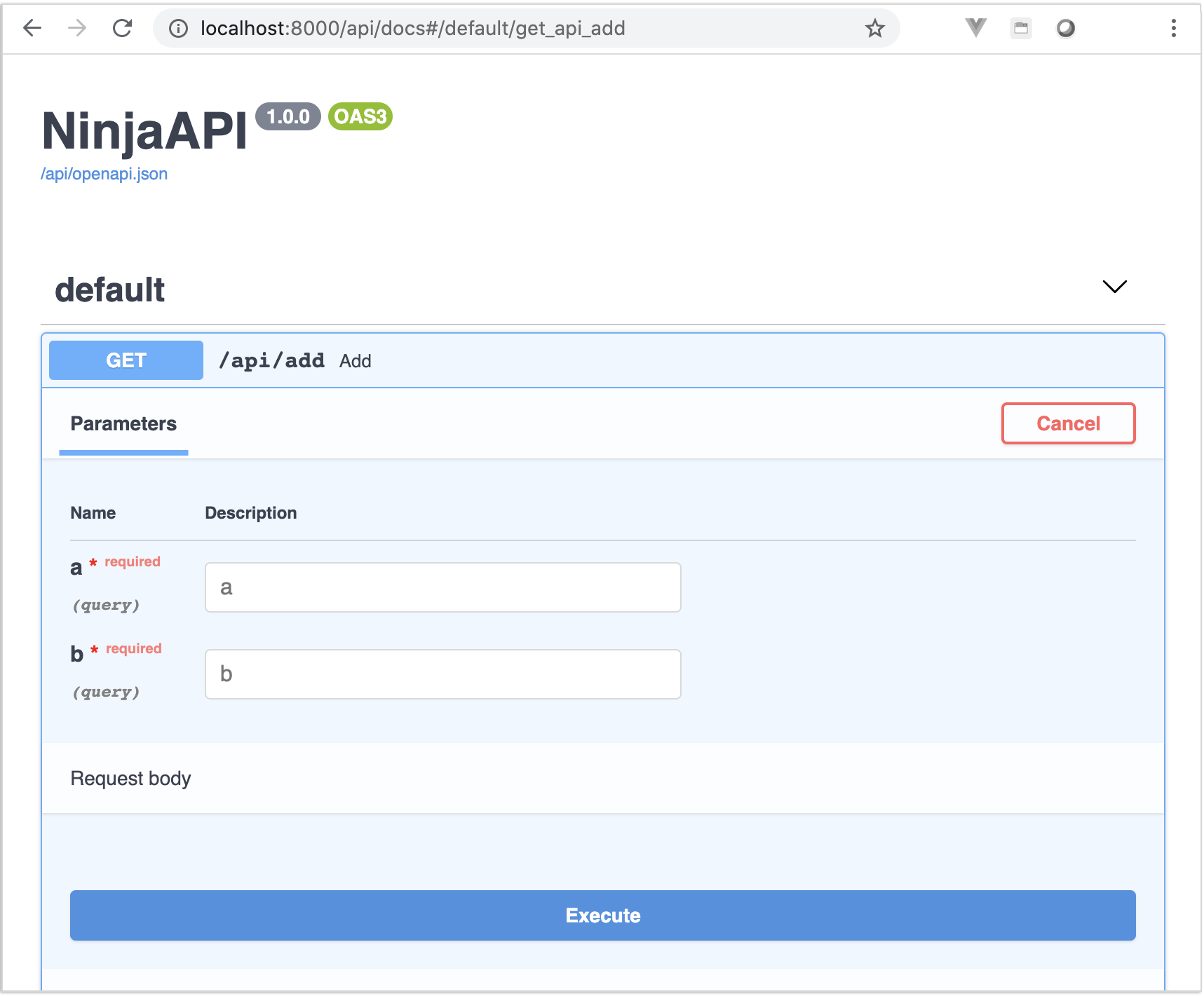
Django Ninja generates an OpenAPI schema from your code, including parameter types, required fields and responses, and serves it with Swagger UI. Click an endpoint, then Try it out to call it from the browser. The raw schema is at /api/openapi.json, ready for client generators and API tools.
The docs are never out of date, because they are built from the same type hints that validate your requests. See OpenAPI & Interactive Docs to customize them.
Next
So far the API only returns hand-built dicts. Next, give your chat rooms and messages a home in the database, connect the API to them, and build a real CRUD API: Models & Schemas.