1 - Quick Start Part 1: First API
Install Django Ninja, create an API in locallibrary, write an endpoint, and open the interactive docs.
Install
Add Django Ninja to your project:
Just like uv add "channels[daphne]" did in the Channels tutorial, this records the dependency in pyproject.toml, installs it into .venv, and pins the exact versions in uv.lock. Commit both files.
Django Ninja works with any Django project. The original Quick Start creates a new project and an events app at this point. You don’t: you already have a project, locallibrary_config, and the chat app plays the part of events for the rest of this guide.
Django Ninja itself doesn’t need to be in INSTALLED_APPS, but adding "ninja" lets Django’s runserver and collectstatic serve the interactive docs’ assets locally instead of from a CDN. Edit locallibrary_config/settings.py and add 'ninja' to the end of INSTALLED_APPS, after chat. Don’t remove anything that’s already there:
# locallibrary_config/settings.py
INSTALLED_APPS = [
    'daphne',
    'django.contrib.admin',
    'django.contrib.auth',
    'django.contrib.contenttypes',
    'django.contrib.sessions',
    'django.contrib.messages',
    'django.contrib.staticfiles',
    # Add our new application
    'catalog.apps.CatalogConfig', # This object was created for us in /catalog/apps.py
    'chat',
    'ninja',
]
Create the API
An API starts with a NinjaAPI instance. Create locallibrary_config/api.py next to urls.py:
# locallibrary_config/api.py
from ninja import NinjaAPI

api = NinjaAPI()


@api.get("/hello")
def hello(request, name: str = "world"):
    return {"message": f"Hello, {name}!"}
Then mount it in locallibrary_config/urls.py, like any other set of views. That file already includes catalog.urls and chat.urls. Add the API in the same style, at the end of the file:
# locallibrary_config/urls.py
# (after the existing blocks)
# Mount the Django Ninja API
from .api import api

urlpatterns += [
    path('api/', api.urls),
]
Leave the admin, catalog, chat, redirect, and static-files entries as they are.
Run the server:
uv run python manage.py runserver
This is the Daphne development server from the Channels tutorial. It serves your Django Ninja API the same way it serves your catalog pages. Redis doesn’t need to be running for this page; only the chat’s WebSockets use it.
Open http://127.0.0.1:8000/api/hello?name=Ninja 🔗:
{"message": "Hello, Ninja!"}
A few things happened with no extra code:
@api.get("/hello") registered a GET endpoint at /api/hello.- The
request argument is a regular Django HttpRequest, so request.user, sessions and middleware all work as usual.
name: str = "world" became an optional query parameter with a default value.- The returned
dict was serialized to JSON.
Type hints are validation
Every argument’s type hint says what the endpoint accepts. Add an endpoint with two required integers to locallibrary_config/api.py:
# locallibrary_config/api.py
@api.get("/add")
def add(request, a: int, b: int):
    return {"result": a + b}
/api/add?a=2&b=3 🔗 returns {"result": 5}, and a and b arrive in your function as real ints, not strings. Invalid input never reaches your code. Try /api/add?a=2&b=three 🔗:
{
    "detail": [
        {
            "type": "int_parsing",
            "loc": ["query", "b"],
            "msg": "Input should be a valid integer, unable to parse string as an integer"
        }
    ]
}
The response has status code 422, and the error points to exactly which parameter failed and why. The same works for float, bool, date, datetime, UUID, enums, and more. See Query Parameters for the full list.
Interactive docs
Now open http://127.0.0.1:8000/api/docs 🔗:
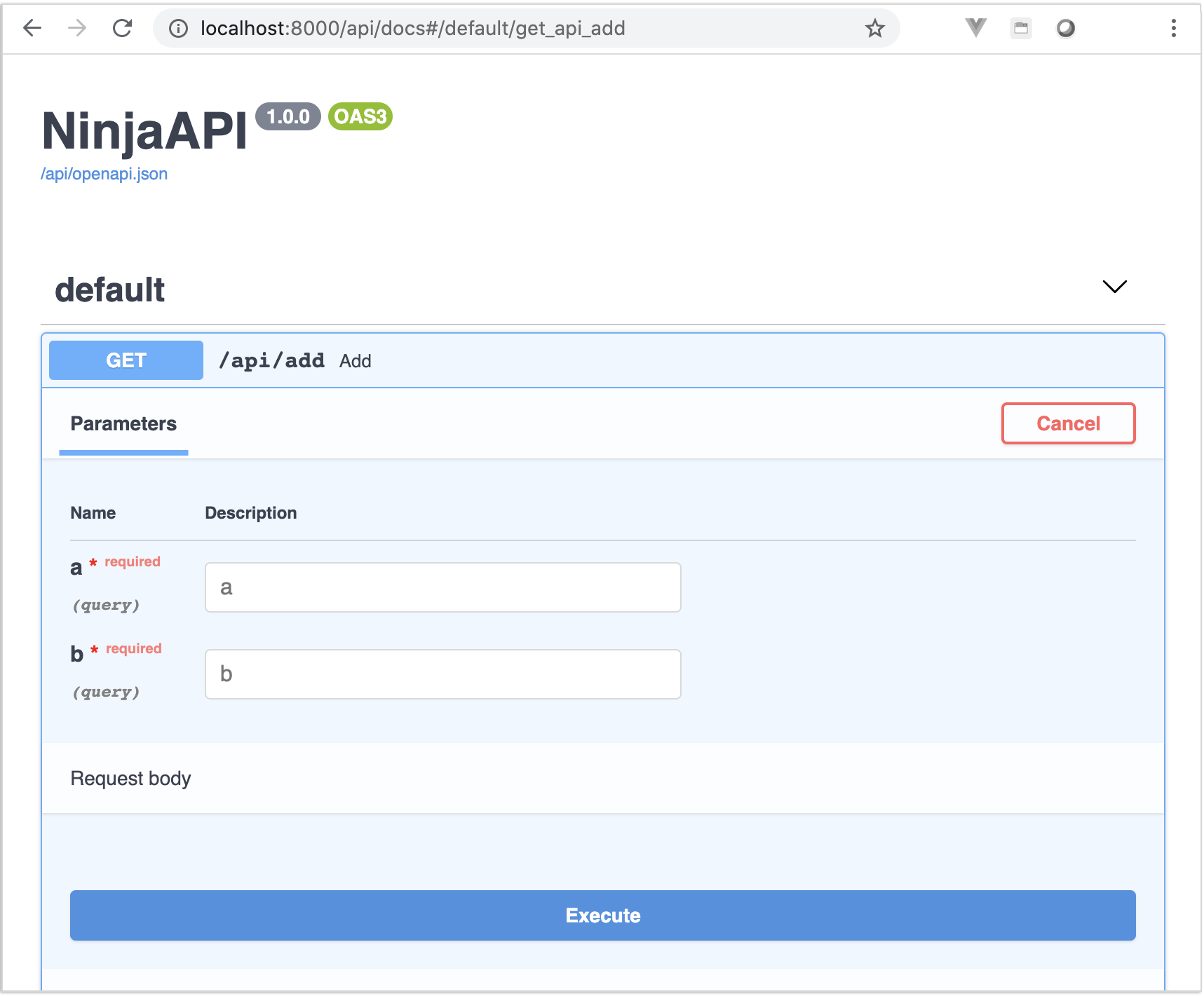
Django Ninja generates an OpenAPI schema from your code, including parameter types, required fields and responses, and serves it with Swagger UI. Click an endpoint, then Try it out to call it from the browser. The raw schema is at /api/openapi.json, ready for client generators and API tools.
The docs are never out of date, because they are built from the same type hints that validate your requests. See OpenAPI & Interactive Docs to customize them.
Next
So far the API only returns hand-built dicts. Next, give your chat rooms and messages a home in the database, connect the API to them, and build a real CRUD API: Models & Schemas.
2 - Quick Start Part 2: Models & Schemas
Save chat rooms and messages to the database, then build a CRUD API for rooms with pagination and filtering.
On this page you’ll give your chat rooms and messages a home in the database, then turn the Room model into a complete CRUD API, and add pagination and filtering. Along the way you’ll see how schemas are generated from your models.
The models
Nothing Ninja-specific here, just regular Django models. The original Quick Start has a single Event model. Your chat needs two: a Room, and the Messages posted in it.
In Part 1 of the Channels tutorial, you deleted chat/models.py because the chat didn’t store anything. Create it again, with this code:
# chat/models.py
from django.conf import settings
from django.db import models


class Room(models.Model):
    name = models.CharField(max_length=50, unique=True)
    topic = models.CharField(max_length=200, blank=True, default="")
    created_at = models.DateTimeField(auto_now_add=True)

    def __str__(self):
        return self.name


class Message(models.Model):
    room = models.ForeignKey(Room, related_name="messages", on_delete=models.CASCADE)
    author = models.ForeignKey(
        settings.AUTH_USER_MODEL,
        null=True,
        blank=True,
        related_name="chat_messages",
        on_delete=models.SET_NULL,
    )
    content = models.TextField()
    created_at = models.DateTimeField(auto_now_add=True)

    class Meta:
        ordering = ["created_at", "id"]

    def __str__(self):
        return f"{self.author or 'anonymous'} in {self.room}: {self.content[:50]}"
- A room’s
name is the name in its URL, like lobby in /chat/lobby/, so two rooms can’t share one: unique=True. It’s also part of the room’s Channels group name (chat_lobby), and group names must be shorter than 100 characters, so 50 leaves plenty of room.
topic is optional. blank=True lets forms and the admin leave it empty, and default="" gives new rooms an empty topic.author is optional too, because anyone can chat without logging in: AuthMiddlewareStack in your asgi.py puts an anonymous user in the scope for them. If a user is deleted, their messages stay, with no author (SET_NULL).related_name="chat_messages" lets you write user.chat_messages. Plain messages would read as if it had to do with Django’s messages framework, which is also installed.Meta.ordering keeps every list of messages oldest first, the way a chat log reads.
You also deleted the chat/migrations/ folder in Part 1 of the Channels tutorial. Naming the app tells makemigrations to create it again:
uv run python manage.py makemigrations chat
uv run python manage.py migrate
You should see:
Migrations for 'chat':
  chat/migrations/0001_initial.py
    + Create model Room
    + Create model Message
Operations to perform:
  Apply all migrations: admin, auth, catalog, chat, contenttypes, sessions
Running migrations:
  Applying chat.0001_initial... OK
Your Channels tutorial also deleted chat/admin.py. Create it again, so you can look at rooms and messages in the admin site:
# chat/admin.py
from django.contrib import admin

from .models import Message, Room

admin.site.register(Room)
admin.site.register(Message)
Save messages from the consumer
The ChatConsumer you wrote in Part 3 of the Channels tutorial is asynchronous. As that page’s note said, an asynchronous consumer can still use Django models, through the model methods that start with a, like aget_or_create() and acreate(), as long as it calls channels.db.aclose_old_connections() before it uses the database. Put the following code in chat/consumers.py. The highlighted lines are new:
# chat/consumers.py
import json

from channels.db import aclose_old_connections
from channels.generic.websocket import AsyncWebsocketConsumer

from .models import Message, Room


class ChatConsumer(AsyncWebsocketConsumer):
    async def connect(self):
        self.room_name = self.scope["url_route"]["kwargs"]["room_name"]
        self.room_group_name = f"chat_{self.room_name}"

        # Find the room in the database, or create it the first time anyone joins
        await aclose_old_connections()
        self.room, _ = await Room.objects.aget_or_create(name=self.room_name)

        # Join room group
        await self.channel_layer.group_add(self.room_group_name, self.channel_name)

        await self.accept()

    async def disconnect(self, close_code):
        # Leave room group
        await self.channel_layer.group_discard(self.room_group_name, self.channel_name)

    # Receive message from WebSocket
    async def receive(self, text_data):
        text_data_json = json.loads(text_data)
        message = text_data_json["message"]

        # Save the message before anyone sees it
        await aclose_old_connections()
        user = self.scope["user"]
        await Message.objects.acreate(
            room=self.room,
            author=user if user.is_authenticated else None,
            content=message,
        )

        # Send message to room group
        await self.channel_layer.group_send(
            self.room_group_name, {"type": "chat.message", "message": message}
        )

    # Receive message from room group
    async def chat_message(self, event):
        message = event["message"]

        # Send message to WebSocket
        await self.send(text_data=json.dumps({"message": message}))
aget_or_create() returns a (room, created) tuple. The first person to open /chat/lobby/ creates the lobby room, and everyone after that joins the same row. The consumer keeps the room in self.room for as long as the WebSocket is open.self.scope["user"] is the user that AuthMiddlewareStack found, the same as request.user in a view. If you’re logged in, for example at /accounts/login/ from Prep 06, your messages get you as their author. Otherwise they’re saved with no author.- The message is saved before it’s sent to the group. If saving fails, nobody sees a message that won’t be there when they reload the page.
Show a room’s history
Saved messages are only useful if you can see them. Update the room view in chat/views.py to load the room’s messages:
# chat/views.py
from django.shortcuts import render

from .models import Room


def index(request):
    return render(request, "chat/index.html")


def room(request, room_name):
    room = Room.objects.filter(name=room_name).first()
    chat_messages = room.messages.all() if room else []
    return render(
        request,
        "chat/room.html",
        {"room_name": room_name, "chat_messages": chat_messages},
    )
The context variable is called chat_messages, not messages. Django’s messages framework already puts a messages variable in every template’s context, and yours would hide it.
The view doesn’t create the room: opening the page isn’t enough to make a room, but connecting the WebSocket is. If the room doesn’t exist yet, there’s no history to show.
In chat/templates/chat/room.html, change only the textarea line, so that it starts with one line per saved message:
<!-- chat/templates/chat/room.html -->
<textarea id="chat-log" cols="100" rows="20">{% for chat_message in chat_messages %}{{ chat_message.content }}
{% endfor %}</textarea><br>
That’s the same format the JavaScript in the page uses when a new message arrives: the message, then a newline. The line break inside the for loop is that newline, so keep it exactly where it is, and don’t add spaces or line breaks anywhere else between the textarea tags. In particular, the {% endfor %} line must start at the very beginning of the line, even though the rest of the file is indented: any spaces before it would end up at the start of every message but the first.
Try it
Make sure Redis is running (see Part 2 of the Channels tutorial), then start the server:
uv run python manage.py runserver
Open http://127.0.0.1:8000/chat/lobby/ 🔗 in two tabs, and send “hello” and “anyone here?” from one of them. Both show up in both tabs, as before. Now reload a tab: the messages are still there.
Go to http://127.0.0.1:8000/admin/chat/message/ 🔗 and log in with your superuser. Your messages are listed there, and the lobby room is under Rooms. Messages you sent while logged in show your username as their author.
Finally, run the Channels tutorial’s tests again, to make sure the chat still works end to end:
uv run python manage.py test chat.tests
The rest of this page is about Django Ninja again. Join two or three more rooms, such as books and random, so the API has a few rooms to work with.
Schemas
A schema describes the shape of data going in or out of your API. Django Ninja schemas are Pydantic models: a class with type-annotated fields.
# locallibrary_config/api.py
from datetime import datetime

from ninja import Schema


class RoomIn(Schema):
    name: str
    topic: str = ""


class RoomOut(Schema):
    id: int
    name: str
    topic: str
    created_at: datetime
RoomIn is what clients send, and RoomOut is what they get back. They’re separate so a client can’t set id or created_at (or, later, fields you’d rather keep private). topic has a default, so it’s optional in RoomIn.
A schema doesn’t have to match a model. You’ll use plain Schema classes for anything that isn’t a table: login payloads, computed results, aggregates.
The same, generated from the model
When a schema mirrors a model, as these do, it only repeats what the model already says. ModelSchema reads the fields from the model instead:
# locallibrary_config/api.py
from ninja import ModelSchema

from chat.models import Room


class RoomIn(ModelSchema):
    class Meta:
        model = Room
        fields = ["name", "topic"]


class RoomOut(ModelSchema):
    class Meta:
        model = Room
        fields = ["id", "name", "topic", "created_at"]
These two classes behave the same as the hand-written ones, with the types and the topic default taken from the model. You also get the model’s constraints: name is limited to 50 characters because of max_length=50. When you add or change a model field, the schema follows.
The rest of this Quick Start uses the ModelSchema versions. You can mix both kinds freely, and a ModelSchema can also declare extra fields of its own (see ModelSchema).
Read: list and detail
Use response= to tell Django Ninja what an endpoint returns:
# locallibrary_config/api.py
from django.shortcuts import get_object_or_404


@api.get("/rooms", response=list[RoomOut])
def list_rooms(request):
    return Room.objects.all()


@api.get("/rooms/{room_id}", response=RoomOut)
def get_room(request, room_id: int):
    return get_object_or_404(Room, id=room_id)
- You return querysets and model instances directly. Django Ninja reads the fields listed in the schema and serializes them to JSON. There’s no serializer to call.
{room_id} in the path becomes the room_id: int argument, converted and validated like the query parameters on the previous page.- Django’s
get_object_or_404 works as usual: a missing room is a 404 JSON response.
- Only the fields in
RoomOut are sent back, even if the object has more. The schema is also the contract shown in the docs.
GET /api/rooms/1:
{
    "id": 1,
    "name": "lobby",
    "topic": "",
    "created_at": "2026-10-19T14:02:11.482Z"
}
Create, update, delete
A schema-typed argument is read from the JSON request body. The highlighted lines are the ones explained below:
# locallibrary_config/api.py
@api.post("/rooms", response={201: RoomOut})
def create_room(request, payload: RoomIn):
    return Room.objects.create(**payload.dict())


@api.put("/rooms/{room_id}", response=RoomOut)
def update_room(request, room_id: int, payload: RoomIn):
    room = get_object_or_404(Room, id=room_id)
    for attr, value in payload.dict().items():
        setattr(room, attr, value)
    room.save()
    return room


@api.delete("/rooms/{room_id}", response={204: None})
def delete_room(request, room_id: int):
    get_object_or_404(Room, id=room_id).delete()
payload: RoomIn means “parse the body as RoomIn”. By the time your function runs, the data is valid and typed.response={201: RoomOut} maps a status code to a schema. With only one code listed, that’s the code every response gets, so create_room returns 201 and delete_room returns 204 with an empty body.update_room mixes a path parameter and a body in one signature. Django Ninja works out where each argument comes from.- Deleting a room also deletes its messages, because of
on_delete=models.CASCADE on Message.room.
Send a bad body, such as {"topic": 42}, and the error lists every problem at once:
{
    "detail": [
        {"type": "missing", "loc": ["body", "payload", "name"], "msg": "Field required"},
        {"type": "string_type", "loc": ["body", "payload", "topic"], "msg": "Input should be a valid string"}
    ]
}
Open /api/docs again. All five room endpoints are there, with request and response schemas, and you can create a room from the browser with Try it out. A room you create there is a real room: open /chat/<its name>/ and chat in it.
More than one status code
Try creating a room called lobby with Try it out. You get a 500 error, not a helpful answer: the name column is unique, so the database refuses the second lobby with an IntegrityError.
When an endpoint can answer in different ways, list every status code in response and return Status(code, data) to pick one. Replace create_room with a version that creates a room, or reports a clash with an existing one:
# locallibrary_config/api.py
from ninja import Schema, Status


class Conflict(Schema):
    message: str
    existing_id: int


@api.post("/rooms", response={201: RoomOut, 409: Conflict})
def create_room(request, payload: RoomIn):
    existing = Room.objects.filter(name=payload.name).first()
    if existing:
        return Status(409, {"message": "A room with that name already exists", "existing_id": existing.id})
    return Status(201, Room.objects.create(**payload.dict()))
Each response is validated against the schema for its code, and both appear in the interactive docs. See Responses for more.
(Renaming a room to a name that’s taken with PUT has the same problem. Fixing update_room the same way is a good exercise.)
Partial updates
For PATCH, where the client sends only the fields that change, use PatchDict[RoomIn]. See Request Body.
A list endpoint that returns every row won’t last long in production. Add one decorator:
# locallibrary_config/api.py
from ninja.pagination import paginate


@api.get("/rooms", response=list[RoomOut])
@paginate
def list_rooms(request):
    return Room.objects.all()
The view still returns a plain queryset. @paginate adds limit and offset query parameters, slices the queryset in the database, and wraps the result:
{
    "items": [{"id": 1, "name": "lobby", ...}],
    "count": 3
}
Page-number and cursor pagination, or your own class, are one argument away. See Pagination.
Filtering
Filters are also a schema: a FilterSchema, read from the query string. Each field maps to an ORM lookup:
# locallibrary_config/api.py
from datetime import timedelta
from typing import Annotated

from django.db.models import Q
from django.utils import timezone
from ninja import FilterLookup, FilterSchema, Query

...


class RoomFilter(FilterSchema):
    search: Annotated[str | None, FilterLookup("name__icontains")] = None
    topic: Annotated[str | None, FilterLookup("topic__icontains")] = None
    recent: bool | None = None

    def filter_recent(self, value: bool) -> Q:
        week_ago = timezone.now() - timedelta(days=7)
        return Q(created_at__gte=week_ago) if value else Q(created_at__lt=week_ago)


@api.get("/rooms", response=list[RoomOut])
@paginate
def list_rooms(request, filters: Query[RoomFilter]):
    return filters.filter(Room.objects.order_by("name"))
search and topic map to icontains lookups on the room’s name and topic.recent needs custom logic, so a filter_recent method returns a Q object: rooms created in the last week, or, with recent=false, the ones before that.- Filters left out of the request are skipped, and everything is validated.
?recent=maybe gets a 422, not a server error.
Now these all work, and combine with pagination:
/api/rooms?search=lob
/api/rooms?recent=true&topic=books
/api/rooms?recent=true&limit=10&offset=20
See Filtering for combining filters with OR, filtering on related models, and more.
What you have so far
Saved chat messages, plus about 60 lines of code that give you a paginated, filterable, validated and documented CRUD API:
| Method |
Path |
|
GET |
/api/rooms |
list, with search, topic, recent, limit, offset |
POST |
/api/rooms |
create |
GET |
/api/rooms/{room_id} |
detail |
PUT |
/api/rooms/{room_id} |
update |
DELETE |
/api/rooms/{room_id} |
delete |
Right now, though, anyone can create or delete rooms, and the API can’t show or post messages. Next: Auth, Routers & Next Steps.
3 - Quick Start Part 3: Auth, Routers & Next Steps
Move the endpoints into the chat app, require login for writes, and let signed-in users post messages to a room.
The rooms API works, but it all lives in one file and anyone can change data. On this page you’ll move the endpoints into the chat app, require login for writes, and let signed-in users post messages that show up in the chat page right away.
Move the endpoints into a router
A Router is a group of endpoints that you mount on the API under a prefix, much like Django’s include(). Each app can own its endpoints and the project just wires them together.
First, move the schemas to chat/schemas.py, unchanged: RoomIn, RoomOut, Conflict and RoomFilter. Then chat/api.py gets the endpoints, with @api replaced by @router and /rooms dropped from the paths:
# chat/api.py
from ninja import Router

router = Router(tags=["rooms"])


@router.get("/", response=list[RoomOut])
@paginate
def list_rooms(request, filters: Query[RoomFilter]):
    ...


@router.get("/{room_id}", response=RoomOut)
def get_room(request, room_id: int):
    ...

# ... and the rest
The chat app now has both chat/views.py, with the views for its HTML pages, and chat/api.py, with its API endpoints. They don’t interfere: chat/urls.py routes to the views, and the API routes to the router.
locallibrary_config/api.py is now only wiring. The hello and add endpoints from page 1 were only for practice, so they go too:
# locallibrary_config/api.py
from ninja import NinjaAPI

from chat.api import router as rooms_router

api = NinjaAPI()

api.add_router("/rooms", rooms_router)
The router’s / becomes /api/rooms/ and /{room_id} becomes /api/rooms/{room_id}. Note the trailing slash on the list: from now on, list and create rooms at /api/rooms/. A GET of /api/rooms still works, because Django redirects it to /api/rooms/, but a POST to it fails, because Django can’t redirect a POST. Thanks to tags=["rooms"], the interactive docs now group these endpoints under a rooms heading. Routers can be nested, and each one can carry its own auth, tags and other settings. See Routers.
Messages
The original Quick Start adds a model here for “user X is going to event Y”. Your chat already has its counterpart, “user X said Y in room Z”: the Message model from page 2. All it needs is schemas. Add them to chat/schemas.py, with Message added to its model import, and the room nested inside each message:
# chat/schemas.py
class MessageIn(ModelSchema):
    class Meta:
        model = Message
        fields = ["content"]


class MessageOut(ModelSchema):
    room: RoomOut

    class Meta:
        model = Message
        fields = ["id", "author", "content", "created_at"]
Declaring room: RoomOut tells Django Ninja to serialize the related Room with RoomOut, instead of returning only its id. author isn’t declared, so it comes back the default way for a foreign key: as the user’s id, or null for a message posted by someone who wasn’t logged in.
Require login
Turn on auth for the whole API in locallibrary_config/api.py:
# locallibrary_config/api.py
from ninja import NinjaAPI
from ninja.security import django_auth

from chat.api import router as rooms_router

api = NinjaAPI(auth=django_auth)

api.add_router("/rooms", rooms_router)
Every endpoint now requires a logged-in user, so you have to opt the public ones back out. Here’s the complete chat/api.py:
# chat/api.py
from asgiref.sync import async_to_sync
from channels.layers import get_channel_layer
from django.shortcuts import get_object_or_404
from ninja import Query, Router, Status
from ninja.errors import HttpError
from ninja.pagination import paginate

from .models import Message, Room
from .schemas import Conflict, MessageIn, MessageOut, RoomFilter, RoomIn, RoomOut

router = Router(tags=["rooms"])


@router.get("/", response=list[RoomOut], auth=None)
@paginate
def list_rooms(request, filters: Query[RoomFilter]):
    return filters.filter(Room.objects.order_by("name"))


@router.get("/mine", response=list[MessageOut])
def my_messages(request):
    return Message.objects.filter(author=request.auth).select_related("room")


@router.get("/{room_id}", response=RoomOut, auth=None)
def get_room(request, room_id: int):
    return get_object_or_404(Room, id=room_id)


@router.post("/", response={201: RoomOut, 409: Conflict})
def create_room(request, payload: RoomIn):
    existing = Room.objects.filter(name=payload.name).first()
    if existing:
        return Status(409, {"message": "A room with that name already exists", "existing_id": existing.id})
    return Status(201, Room.objects.create(**payload.dict()))


@router.put("/{room_id}", response=RoomOut)
def update_room(request, room_id: int, payload: RoomIn):
    room = get_object_or_404(Room, id=room_id)
    for attr, value in payload.dict().items():
        setattr(room, attr, value)
    room.save()
    return room


@router.delete("/{room_id}", response={204: None})
def delete_room(request, room_id: int):
    get_object_or_404(Room, id=room_id).delete()


@router.get("/{room_id}/messages", response=list[MessageOut], auth=None)
@paginate
def list_messages(request, room_id: int):
    room = get_object_or_404(Room, id=room_id)
    return room.messages.select_related("room")


@router.post("/{room_id}/messages", response={201: MessageOut})
def post_message(request, room_id: int, payload: MessageIn):
    room = get_object_or_404(Room, id=room_id)
    if not payload.content.strip():
        raise HttpError(400, "Messages can't be blank")
    message = Message.objects.create(room=room, author=request.auth, content=payload.content)
    # Send it to everyone in the room's chat page, the way ChatConsumer.receive does
    async_to_sync(get_channel_layer().group_send)(
        f"chat_{room.name}", {"type": "chat.message", "message": message.content}
    )
    return message
What’s new:
NinjaAPI(auth=django_auth) requires a logged-in Django user for every endpoint, so new endpoints are protected unless you say otherwise. django_auth uses the regular Django session, the same one the admin and your catalog’s login pages use.auth=None opts the three read endpoints back out, so anyone can browse rooms and read their messages, just as anyone can open a chat page. Auth can be set on the whole API, on a router (Router(auth=...)) or on a single endpoint, and the most specific one wins.request.auth is whatever the authenticator returned. For django_auth that’s the User. my_messages lists the messages you posted, from the chat page while logged in or through the API, each with its room nested inside.HttpError(400, "...") stops the request and returns that status with a JSON {"detail": "..."} body. There’s no need to build error responses by hand.list_messages returns the messages oldest first, thanks to Meta.ordering on Message, and pages them with @paginate. select_related("room") fetches each message’s room in the same query, since MessageOut nests it.post_message sends the new message to the room’s group on the channel layer, exactly like ChatConsumer.receive does. Every ChatConsumer in that room receives the chat.message event, and its chat_message method sends the message to its browser. The view is synchronous and channel layer methods are asynchronous, so it calls them through async_to_sync, like your first, synchronous consumer did in Part 2 of the Channels tutorial. That means Redis must be running for post_message to work.
An anonymous request to a protected endpoint gets a 401:
$ curl http://127.0.0.1:8000/api/rooms/mine
{"detail": "Unauthorized"}
To try it out, make sure Redis is running, log in at /admin/ (or at /accounts/login/, from Prep 06), and open /api/docs. Swagger UI reuses your session and sends the CSRF token for you, so you can post a message with Try it out.
In a second tab, open the chat page for the room you’ll post to, such as http://127.0.0.1:8000/chat/lobby/ 🔗. Find its id with GET /api/rooms/?search=lobby. Then, back in the docs, POST /api/rooms/1/messages (with your room’s id) and the body {"content": "hello from the API"}. The message appears in the chat tab right away, and the response has the nested schema:
{
    "room": {
        "id": 1,
        "name": "lobby",
        "topic": "",
        "created_at": "2026-10-19T14:02:11.482Z"
    },
    "id": 7,
    "author": 1,
    "content": "hello from the API",
    "created_at": "2026-10-19T15:21:40.913Z"
}
Your message and user ids will be different. Post {"content": " "} and you get 400 {"detail": "Messages can't be blank"}.
Not using sessions?
django_auth suits browser clients on the same site. For mobile apps or other servers, use an API key or bearer token instead. It’s a small class with one authenticate() method; see Authentication. Part 4 of our Django Ninja Tutorial builds one.
What you’ve built
In three pages, and without writing any serializers, URL patterns or docs by hand, you have a chat that remembers its messages, and an API with:
- typed, validated path, query and body parameters,
- schemas generated from Django models, including a nested one,
- full CRUD, pagination and filtering,
- session auth with public and protected endpoints,
- proper error responses,
- messages posted through the API that reach the chat page live, and
- interactive OpenAPI docs that always match the code.
Where to go next
Our Django Ninja Tutorial builds a larger project step by step, in your locallibrary next to everything you’ve built so far. The Guide covers each feature in depth. Here’s where to read more about everything used in this Quick Start:
| You used |
Read more |
NinjaAPI, urls.py |
NinjaAPI, URLs & Reverse |
@api.get, @api.post, … |
Operations |
name: str, room_id: int |
Query Parameters, Path Parameters |
payload: RoomIn |
Request Body, plus Form Data and File Uploads |
ModelSchema, nested schemas |
ModelSchema, Schemas |
response={201: ...} |
Responses |
@paginate |
Pagination |
FilterSchema |
Filtering |
Router, add_router |
Routers |
auth=django_auth, request.auth |
Authentication, CSRF |
HttpError |
Errors & Exception Handling |
/api/docs |
OpenAPI & Interactive Docs |
async_to_sync, group_send |
Channel Layers in the Channels docs |
Features you haven’t seen yet: async views, throttling, API versioning, custom renderers and a test client.