This is the multi-page printable view of this section.
Click here to print.
Return to the regular view of this page.
Prep 01: Setup Dev Environment and Creating a skeleton website
- Python via uv
- Django 6.1.
- MDN Django Tutorial through Part 2
- Put it on github
Prereq
- Create a directory for 347 work on your local machine. See our docs on:
- Working Locally vs. Remotely
- 🚨 Complete the auth via keypairs steps
- Files
Instructions
- Do the following (“do” as in read, take notes, and try to make work) from our fork of the MDN Django Tutorial:
- Django introduction
- Setting up a Django development environment
- Django Tutorial: The Local Library website
- Django Tutorial Part 2: Creating a skeleton website
Submitting
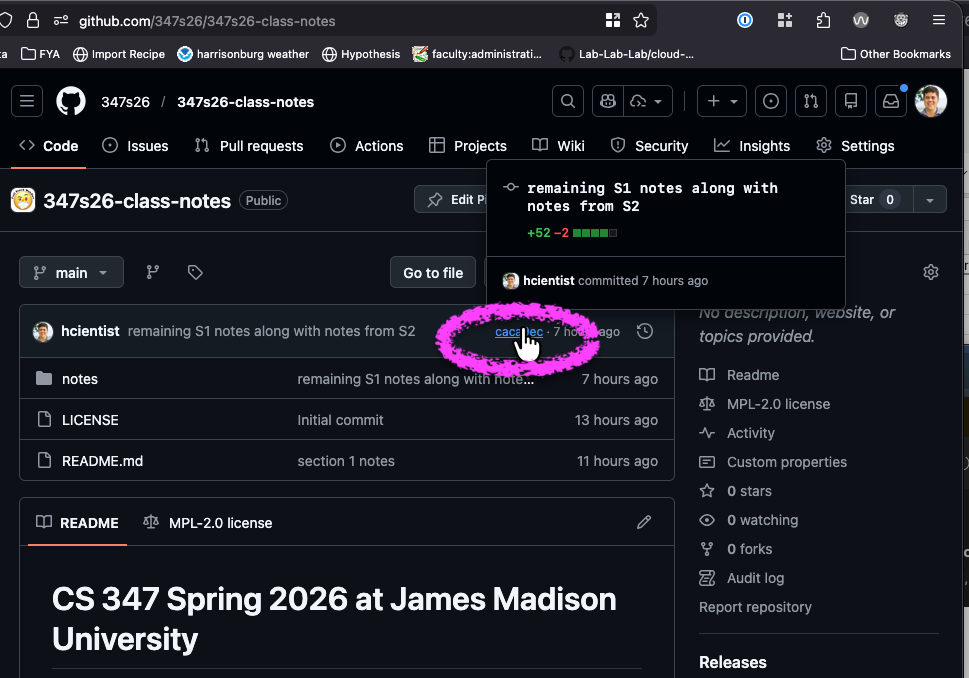
- After you complete the steps linked above, you will have pushed some commits to a github repository.
- Github provides a link for each commit.
- Submit a
commit.url file containing the url to the latest commit of your public github repo that was relevant to the steps above to gradescope.
- Here’s an example of what such a URL might look like
https://github.com/347s26/locallibrary-hcientist/commit/caca9ecbcc79f5aa3ec29300c47c123b9a7a0ca5. See the screenshot below to see where to click to reach the right kind of URL.